A buyer commits to your listing and then nothing — no payment, no message, no response. It’s one of the more frustrating things eBay buyer has not paid that happens to eBay sellers, and the right response isn’t obvious.
Wait too long and you’ve got stock sitting unsold. Cancel too early and you risk a defect. Open a case incorrectly and the outcome can work against you.
This guide covers exactly what to do when an eBay buyer has not paid: the timeline, the right sequence of steps, what happens to your seller metrics, and how to recover your fees and get the item relisted.
How Long Do Buyers Have to Pay on eBay?
eBay gives buyers a payment window that varies by listing type:
Buy It Now listings: payment is typically expected at the time of purchase. Most buyers pay immediately.
Auction listings: buyers have up to 4 days after the auction ends to complete payment.
In practice, most non-payment situations involve auctions or Buy It Now listings where the buyer clicked through and then didn’t follow through with payment.
What eBay’s policy says
eBay’s buyer policy requires payment within the timeframe shown at checkout. If payment isn’t received, sellers have the right to open an Unpaid Item case — but there’s a minimum waiting period before you can do so.
What to Do When an eBay Buyer Has Not Paid
Don’t cancel immediately. The correct sequence is: wait → send a reminder → open an Unpaid Item case → then cancel if the case closes without payment. Skipping steps can create a defect on your account.
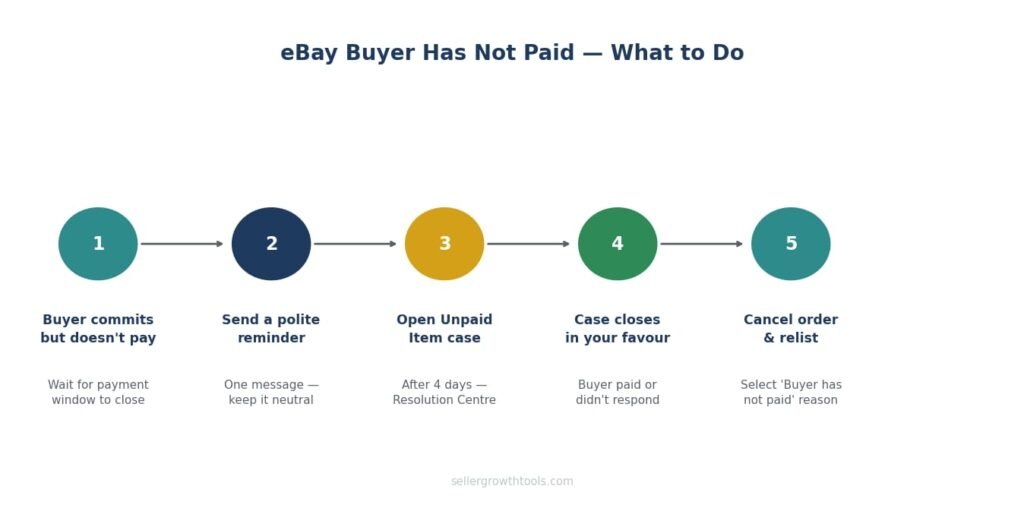
Step 1 — Wait for the payment window to close
For auctions: wait at least 2 days after the auction ends before taking any action. For Buy It Now: eBay typically requires a short waiting period before you can open a case.
Most genuine buyers who intended to pay will do so within this window. Chasing payment in the first few hours is rarely productive.
Step 2 — Send a polite payment reminder
Before opening a formal case, send the buyer a short, neutral message:
Hi, just a friendly reminder that payment for [item name] is still pending. Please complete checkout when you get a chance — let me know if you have any questions.
Keep it factual. Don’t threaten feedback or escalation. One message is enough.
Step 3 — Open an Unpaid Item case
If 4 days have passed since the sale and payment still hasn’t arrived, open an Unpaid Item case through Resolution Centre.
Go to Seller Hub → Orders → find the order → select “Open an Unpaid Item case” or go to Resolution Centre directly.
Once the case is open, eBay notifies the buyer and gives them a further opportunity to pay.
Step 4 — Close the case and cancel the order
If the buyer still hasn’t paid after the case period, close the case. Once closed in your favour, cancel the order and your final value fee is credited back.
When cancelling: select “Buyer has not paid” as the reason — this is critical. Choosing the wrong reason can create a defect.
Step 5 — Relist the item
Once the order is cancelled and the case is closed, relist the item. If you use Good ‘Til Cancelled, check that the listing is still active and the item specifics are accurate.
eBay Buyer Has Not Paid After 4 Days — What Changes?
After 4 days, the formal Unpaid Item process becomes available. This is the point at which you can:
Open an Unpaid Item case through Resolution Centre
Request that eBay send the buyer a formal reminder
Begin the process of recovering your final value fee
Before 4 days, you’re limited to sending a message. This isn’t ideal if the item is time-sensitive, but acting earlier can cause issues with your account metrics.
Can I Cancel the Order Without Opening a Case?
Yes — but the cancellation reason matters enormously.
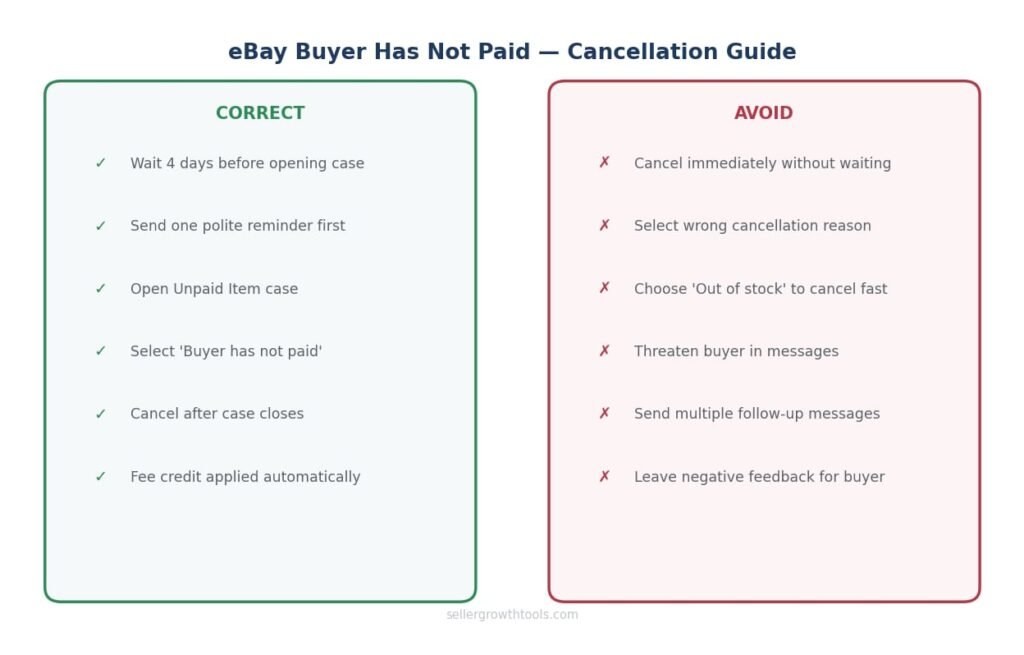
Cancelling with “Buyer has not paid”
This is the correct reason when a buyer hasn’t paid. It triggers a final value fee credit and does not count as a defect on your account.
Cancelling with “Buyer asked to cancel” or “Out of stock”
Only use these if they’re accurate. Using the wrong reason — particularly “out of stock” when the item is available — can count against your seller metrics.
Mutual cancellation
If you cancel and the buyer accepts, the sale is removed cleanly. If the buyer doesn’t respond, it still goes through — but eBay may treat it differently depending on which reason you’ve selected.
Should You Message the Buyer First?
Yes — in most cases, a short message before opening a case is worth sending.
Not because you’re required to, but because it works. A significant portion of non-paying buyers are genuine — they made a purchase, got distracted, and didn’t complete checkout. A neutral reminder often prompts immediate payment.
What not to do:
Don’t threaten negative feedback
Don’t demand payment aggressively
Don’t send multiple messages in quick succession
One message is enough. If there’s no response within a day or two, proceed with the formal case.
What Happens to Your Seller Metrics?
Important: An Unpaid Item case that closes in your favour does not count as a defect. Cancelling for the correct reason — “Buyer has not paid” — also does not affect your seller performance metrics.
What does affect your metrics
A cancellation with the wrong reason — if you cancel and select “Out of stock” when the real reason is non-payment, that counts as a seller-initiated cancellation and does affect your metrics.
Repeated mutual cancellations — a pattern of cancellations, even handled correctly, can draw attention in eBay’s systems at scale.
Unpaid Item strikes for buyers
When you close an Unpaid Item case, eBay may record a strike against the buyer’s account. Buyers who accumulate strikes can lose buying privileges. This isn’t something you control — it happens as a result of the case closing correctly.
For more on how seller metrics work: eBay Seller Performance Guide
Getting Your Final Value Fee Back
When a buyer doesn’t pay and the case closes correctly, eBay credits your final value fee automatically. Check your Seller Hub billing summary to confirm the credit has been applied. On high-value items, this can take a day or two to appear.
To understand what eBay charges in the first place: eBay Selling Fees Guide
Non-Payment and Your Account — The Bigger Picture
One or two non-paying buyers a month is a normal part of selling on eBay, especially on auction-format listings. The process exists precisely because it happens regularly.
What becomes a problem is handling it incorrectly — cancelling for the wrong reason, not opening cases when you should, or letting orders sit indefinitely in a pending state.
When non-payment is part of a bigger issue
If you’re seeing frequent non-payment, particularly on auction listings, consider switching to Buy It Now with immediate payment required. This setting eliminates non-payment almost entirely — buyers can’t commit without completing checkout.
UK vs US — Any Differences?
The Unpaid Item process is essentially the same in both markets. The main practical difference is currency and fee amounts being credited back — the process through Resolution Centre is identical.
One UK-specific note: if you’re a private seller on eBay UK, a non-paying buyer means you’ve had a listing occupied for days with nothing to show for it — the real cost beyond the fee.
Frequently Asked Questions
What do I do if an eBay buyer has not paid?
Wait for the payment window to close, send a polite reminder, then open an Unpaid Item case through Resolution Centre if payment still hasn’t arrived after 4 days.
How long do I have to wait before opening an Unpaid Item case?
Typically 4 days after the transaction date. eBay’s Resolution Centre will show the option once this window has passed.
eBay buyer has not paid — can I cancel the order?
Yes, but select “Buyer has not paid” as the cancellation reason. This ensures you receive your final value fee credit and the cancellation doesn’t count against your seller metrics.
Will a non-paying buyer affect my seller performance?
Not if you handle it correctly. An Unpaid Item case closed in your favour doesn’t create a defect. Cancelling for the correct reason also doesn’t affect your metrics.
Should I leave negative feedback for a non-paying buyer?
eBay restricts sellers from leaving negative feedback for buyers — you can only leave positive feedback or no feedback. The Unpaid Item case is the formal route for addressing non-payment.
What if the buyer pays after I’ve opened a case?
Close the case as resolved and proceed normally. Accept the payment and don’t cancel the order.
Can eBay force a buyer to pay?
No. eBay can record a strike and restrict the buyer’s account, but can’t compel payment. The seller’s remedy is the Unpaid Item case, fee credit, and relisting.
What if the buyer disputes the Unpaid Item case?
If the buyer claims they paid or has a checkout issue, review their message and check your payments in Seller Hub. If payment genuinely hasn’t arrived, close the case after the waiting period.
Related Guides
When the buyer says the item never arrived — a different problem, different process.
Account-level restrictions and what to do when eBay sends an MC999 notice.
What happens when account issues escalate beyond a restriction.
How cancellations and cases affect your defect rate and seller level.
What eBay charges — and how the final value fee credit works when a sale falls through.
Muhammad Usman
eCommerce & SEO Specialist
Muhammad manages eCommerce operations and SEO for UK sellers across eBay, Etsy, Shopify and TikTok Shop. He built SellerGrowthTools to give sellers the fee and profit numbers they need before they list, not after.
Every guide here is checked against eBay’s current documentation before publishing and revisited when policies change. More about this site · Get in touch