You’ve received an eBay MC999 message and your account is restricted or suspended. The message itself rarely explains exactly why — and that gap between “something is wrong” and “here’s what to do about it” is where most sellers make avoidable mistakes.
This guide covers what MC999 actually is, where to find the real reason for your restriction, what steps to take, and what not to do while your account is under review.
What Is eBay MC999?
MC999 is the internal code eBay uses for account restriction and suspension notices. When your account is restricted, eBay sends a message with this code attached — but the code itself doesn’t tell you the specific reason. It’s a notification type, not a cause.
The restriction can range from a temporary hold on selling activity to a full suspension, depending on what triggered it. Sellers who treat all MC999 notices as the same thing — and respond the same way regardless — usually make the situation worse.
MC999 vs MC011 — what’s the difference?
MC011 is a listing-level restriction: eBay has a question about a specific item you’ve listed. MC999 is an account-level restriction: something about your account itself has triggered a review. They require different responses and different evidence.
If you’ve received MC011, see our eBay MC011 guide.
Why Sellers Receive MC999 Restrictions
eBay does not publish a fixed list of reasons that trigger MC999 — and the reason matters, because the resolution path depends entirely on what caused it.
Common categories of reasons include:
Seller performance issues — a defect rate or case closure rate that has stayed above eBay’s threshold long enough to trigger account-level action, rather than just a Below Standard rating.
Policy violations — listing restricted items, counterfeit goods, prohibited categories, or items that violate VeRO (Verified Rights Owner) notices.
Verification requirements — eBay may require identity verification, business documentation, or proof of supply chain legitimacy, particularly for new accounts or accounts that have scaled quickly.
Unusual account activity — sudden changes in listing volume, category shifts, or payment patterns that trigger eBay’s automated review systems.
Outstanding financial obligations — unpaid fees, unresolved disputes, or chargebacks on the account.
The important point: eBay’s MC999 message to you will contain the specific reason. That message — not this guide, not a forum post — is the authoritative source for what triggered your restriction.
How to Find the Exact Reason for Your MC999 Restriction
The specific reason for your restriction is in two places: your registered email address and your eBay Messages inbox. Read both in full before you do anything else.
Check your registered email
eBay sends restriction notices to the email address registered on your account. Search for emails from eBay sent around the time your restriction appeared — the subject line will usually reference your account status directly.
Check eBay Messages
Log into your account and go to Messages (My eBay → Messages). eBay’s communication about the restriction will be there, including what they’re asking for and what the next step is.
Check your Seller Hub
Some restrictions show a banner or notification in Seller Hub with a direct link to what eBay needs from you. This is the fastest route to the resolution steps if it’s available.
Do not contact eBay before reading these sources. The answer to “why is my account restricted” is already there — calling or messaging eBay before you’ve read their communication wastes time and can sometimes complicate the process.
What to Do After Receiving an eBay MC999 Restriction
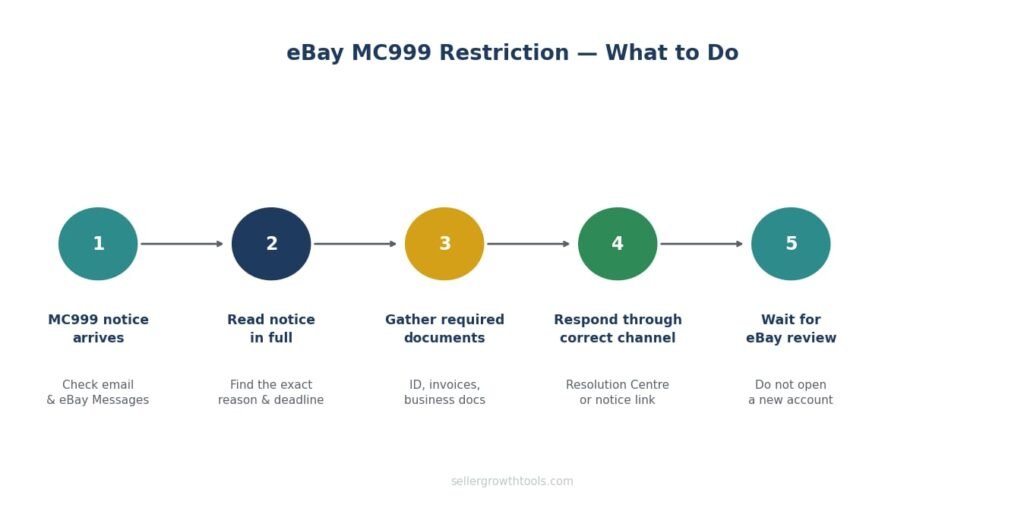
The right response depends on what eBay is asking for — which is why reading the restriction notice comes first. The general process:
Step 1 — Read the restriction notice in full
Understand exactly what eBay has said. What triggered it? What are they asking for? Is there a deadline? Do not skim this
Step 2 — Gather what eBay has asked for
If eBay is requesting documentation, gather exactly what they’ve specified — not more, not less. Common requests include:
Government-issued photo ID
Proof of address (recent utility bill or bank statement)
Business registration documents (for business accounts)
Supplier invoices or proof of authentic supply chain
Explanation of specific listings or account activity
Step 3 — Respond through the correct channel
eBay’s restriction notice will tell you how to respond — usually through a link in the message or via the Resolution Centre. Use that channel, not a general customer service form.
Step 4 — Be clear and factual
If eBay is asking for an explanation, provide one that is factual and directly addresses what they’ve asked. Don’t over-explain or add information they haven’t asked for. Don’t make promises about future behaviour — respond to what triggered the restriction.
Step 5 — Wait for eBay’s review
Once you’ve submitted what’s required, eBay needs time to review it. Sending repeated messages asking for updates slows the process and can push your case down the queue.
Documents and Verification eBay May Request
Depending on the reason for your MC999, eBay may ask for any of the following:
Identity verification
Passport, driving licence, or national ID card
Proof of address dated within the last 3 months
Business verification
Companies House registration (UK)
VAT registration certificate
Business bank account details
Inventory and supply chain
Supplier invoices showing the items you’re selling are authentic
Receipts showing you purchased items before listing them
Brand authorisation letters if selling branded goods
Account activity explanation
Written explanation of any unusual listing patterns
Clarification on items flagged by eBay’s systems
Provide exactly what’s asked. Documents should be clear, legible scans — not photos taken in poor lighting. If a document is in a language other than English, include a certified translation.
Can You Appeal an MC999 Restriction?
Yes — but the word “appeal” is slightly misleading for most MC999 cases. In most situations, eBay isn’t looking for an appeal in the legal sense; they’re looking for a response to what they’ve requested.
If eBay has asked for documentation
Your “appeal” is submitting the documentation correctly and completely. Once eBay reviews it and is satisfied, the restriction is lifted. This isn’t a negotiation — it’s a process.
If eBay has suspended the account for a policy violation
A genuine suspension for policy violations is more serious. You can submit an appeal through eBay’s appeals process, but the outcome depends on the nature of the violation and your account history.
If you believe the restriction is an error
Gather any evidence that supports your position and submit it through the Resolution Centre. eBay’s automated systems do occasionally flag accounts incorrectly, and providing clear evidence to the contrary usually resolves it.
What Not to Do After an MC999 Restriction
Important: The mistakes sellers make after an MC999 restriction are often more damaging than the restriction itself. Avoid these.
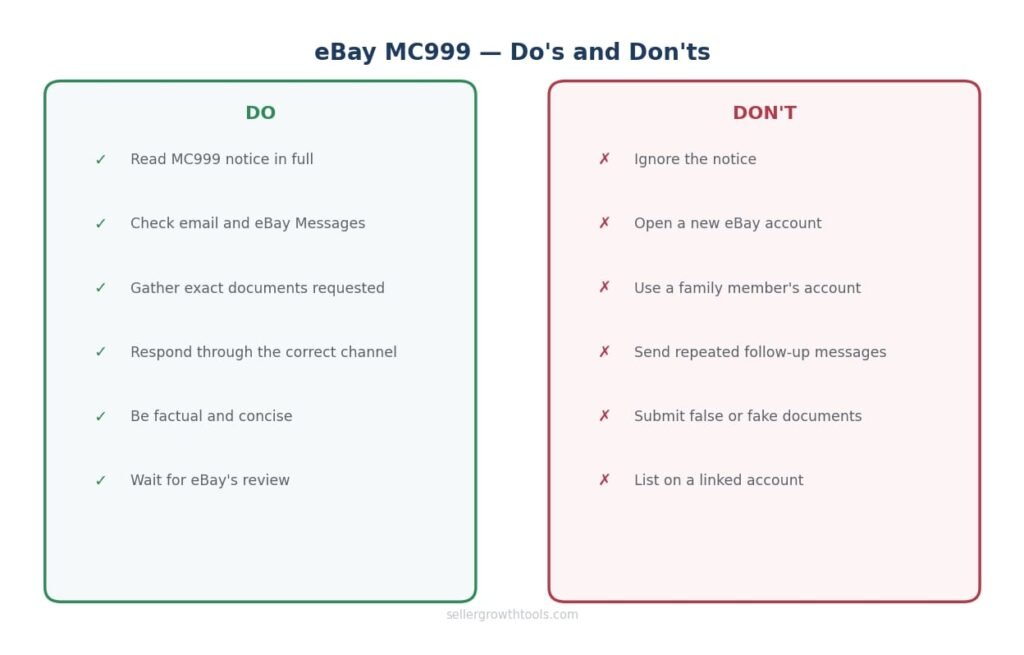
The mistakes sellers make after an MC999 restriction are often more damaging than the restriction itself. These are the most common ones.
Don’t ignore it. MC999 restrictions don’t resolve themselves. If eBay has asked for something and you don’t respond within their timeframe, the restriction may become permanent.
Don’t open a new account. eBay explicitly states that creating a new account — or using an existing second account — to avoid the consequences of a restriction is against policy. eBay links accounts through shared information: name, address, payment details, device, and IP address. A second account created to circumvent a restriction can result in that account being restricted too, and makes the original restriction harder to resolve.
Don’t list on a family member’s account. Same principle — eBay can identify linked accounts, and using someone else’s account while yours is restricted typically results in both accounts being affected.
Don’t spam eBay with messages. One clear, complete response is more effective than multiple follow-ups. Repeated contacts can delay review.
Don’t make things up. If eBay asks for invoices and you don’t have them, say so and explain why — don’t fabricate documents. eBay verifies documentation, and submitting false information converts a resolvable restriction into a permanent one.
Can You Open Another eBay Account?
This is one of the most common questions after an MC999 restriction, and the answer is clear: not to get around the restriction.
eBay’s policy allows sellers to have multiple accounts for legitimate separate business purposes — for example, running a vintage clothing store and a separate electronics business. What isn’t allowed is using a new or existing account to avoid the consequences of a restriction or suspension on another account.
If eBay determines that’s what’s happening, similar restrictions can be applied to the linked account. The original restriction also becomes significantly harder to resolve.
If you have a legitimate reason to need a second account, resolve the MC999 on your existing account first, then contact eBay to request a second account through the proper channel.
How to Prevent MC999 Restrictions
Most MC999 restrictions fall into predictable categories — and most are avoidable
Keep your seller metrics clean
Performance-based restrictions come from metrics staying outside eBay’s thresholds for extended periods. Monitor your defect rate and case closure rate in Seller Hub regularly — don’t wait for an MC999 to find out there’s a problem.
See: eBay Seller Performance Guide
Stay within eBay’s policies on what you list
Check eBay’s restricted items list before listing anything you’re unsure about. eBay Restricted items Policy VeRO violations in particular can trigger immediate account-level action, not just listing removal.
Keep your account information current
Outdated contact details, expired payment methods, or mismatched business information can trigger verification requests. Keep your registered email, address, and payment details accurate
Scale carefully
Accounts that grow very quickly — in listing volume or sales value — can trigger automated reviews. This isn’t a reason not to grow, but it is a reason to have your documentation ready: invoices, supplier details, and any brand authorisations you’re relying on.
Respond to any eBay communication promptly
If eBay sends a verification request or a question about a listing and you ignore it, it can escalate to an MC999 restriction. Treat any communication from eBay as a priority.
Frequently Asked Questions
What does MC999 mean on eBay?
MC999 is eBay’s internal code for account restriction or suspension notices. The code itself doesn’t specify the reason — you’ll find the exact reason in your registered email and eBay Messages inbox.
How do I resolve an eBay MC999 restriction?
Read eBay’s restriction notice in full, gather the documentation or information they’ve requested, and respond through the channel they’ve specified. The resolution path depends entirely on what triggered the restriction.
Why did I receive an eBay MC999?
Common reasons include seller performance issues, policy violations, verification requirements, unusual account activity, or outstanding financial obligations. Your specific reason is in the MC999 notice eBay sent you.
How long does an MC999 restriction last?
It depends on the reason and how quickly you respond. Verification-based restrictions are often resolved within a few days of submitting the required documents. Policy violation suspensions can take longer and may not be reversible in all cases.
Can I still buy on eBay with an MC999 restriction?
In most cases, yes — MC999 typically restricts selling activity specifically. Buying is usually unaffected, though this depends on the nature of the restriction.
What to do after eBay MC999 suspension?
Read the notice, gather what eBay has asked for, and respond through the Resolution Centre or the link in eBay’s message. Do not open a new account while the suspension is active.
Can I appeal an MC999 suspension?
Yes. For documentation requests, submitting the correct documentation is your appeal. For policy-based suspensions, you can submit a formal appeal through eBay’s appeals process, ideally with evidence that addresses the specific violation cited.
Related Guides
When restriction becomes suspension — causes, appeal routes and what actually works.
MC011 is a listing-level restriction — different cause, different fix.
The metrics that can trigger performance-based MC999 restrictions.
Where performance issues start before they escalate to account restrictions.
How unresolved INR cases affect your metrics and account standing.
Muhammad Usman
eCommerce & SEO Specialist
Muhammad manages eCommerce operations and SEO for UK sellers across eBay, Etsy, Shopify and TikTok Shop. He built SellerGrowthTools to give sellers the fee and profit numbers they need before they list, not after.
Every guide here is checked against eBay’s current documentation before publishing and revisited when policies change. More about this site · Get in touch