An eBay Store subscription gives sellers access to a branded storefront, extra listing allowances, and potentially lower selling fees. But whether it is actually worth paying for depends entirely on your sales volume, product categories, and whether the savings outweigh the monthly cost.
This guide covers everything you need to know about eBay Store subscriptions in 2026 — how they work, what each plan includes, how US and UK plans compare, and a straightforward way to work out whether subscribing makes financial sense for your business.
What Is an eBay Store Subscription?
An eBay Store subscription is a paid monthly or annual membership that unlocks a dedicated storefront and a range of additional selling tools on eBay.
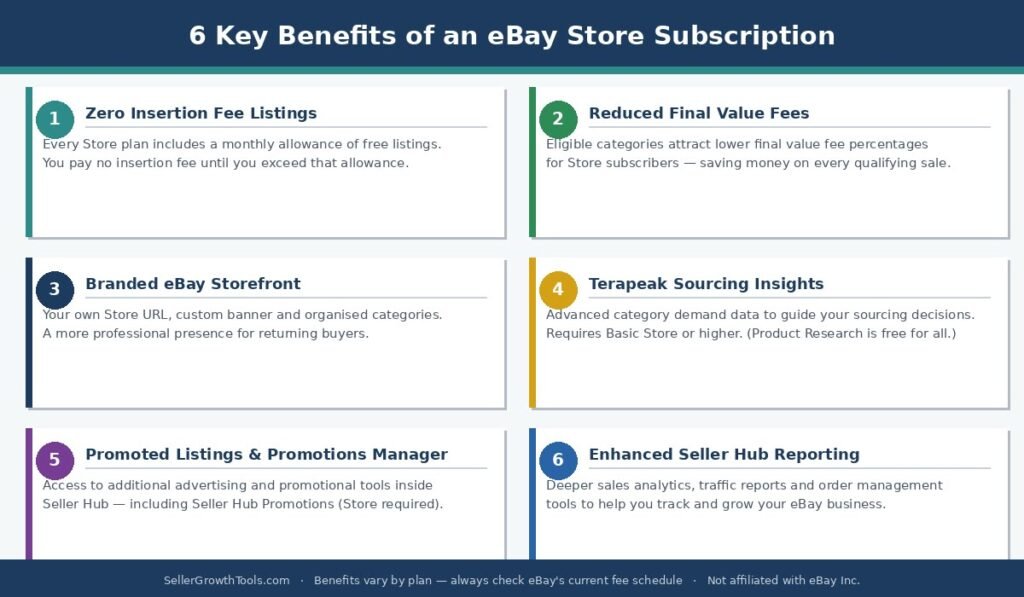
When you subscribe to an eBay Store, you get access to:
A branded eBay storefront where buyers can browse all your listings in one place
Additional monthly listing allowances with zero insertion fees
Reduced final value fees in certain eligible categories, depending on the plan
Access to Terapeak Sourcing Insights (Basic Store and above; Terapeak Product Research is free for all sellers)
Access to Promoted Listings Advanced (CPC advertising) and Seller Hub Promotions
Marketing and promotional tools within Seller Hub
It is important to understand that an eBay Store is not a separate website. It is a customized section within eBay where all your listings are displayed together under your brand name. Buyers reach your Store through eBay search results, your seller profile, or direct links you share.
You do not need a Store to sell on eBay. Non-Store sellers can still list products and pay the standard eBay selling fees. The question is whether the Store’s benefits create enough value to justify its monthly cost.
eBay Store vs No Store — The Core Difference
Before comparing plans, it helps to understand what actually changes when you subscribe.
Without a Store, every listing you create beyond the free monthly allowance incurs an insertion fee. Your final value fees are also set at the standard rate for your category. You still have access to Seller Hub, standard listing tools, and basic Promoted Listings.
With a Store subscription, you receive a significantly higher number of zero-insertion-fee listings each month. Depending on the plan, you may also pay lower final value fees on eligible categories. The higher the subscription tier, the larger the listing allowance and the greater the potential fee saving.
The financial logic is straightforward: if the total you save on insertion fees and final value fees each month exceeds the cost of the subscription, the Store pays for itself.
eBay Store Subscription Plans and Fees — US
eBay.com offers five Store subscription tiers, available on either a monthly or annual billing cycle.
| Store Plan | Monthly Renewal | Annual Renewal (Billed Monthly) | Best For |
|---|---|---|---|
| Starter | $7.95 | $4.95 | Branding only, low listing volume |
| Basic | $27.95 | $21.95 | Growing sellers, regular listing volume |
| Premium | $74.95 | $59.95 | High-volume sellers, multiple categories |
| Anchor | $349.95 | $299.95 | Large-scale businesses, dedicated support |
| Enterprise | Not available | $2,999.95 | Enterprise-level operations |
The annual renewal option involves a yearly subscription commitment, even though eBay bills monthly. Choosing annual billing saves money compared with rolling monthly renewals.
Starter is mainly for sellers who want a branded storefront rather than significant fee savings. Basic and above are where the insertion fee and final value fee benefits become meaningful for active sellers.
eBay Shop Subscription Plans — UK
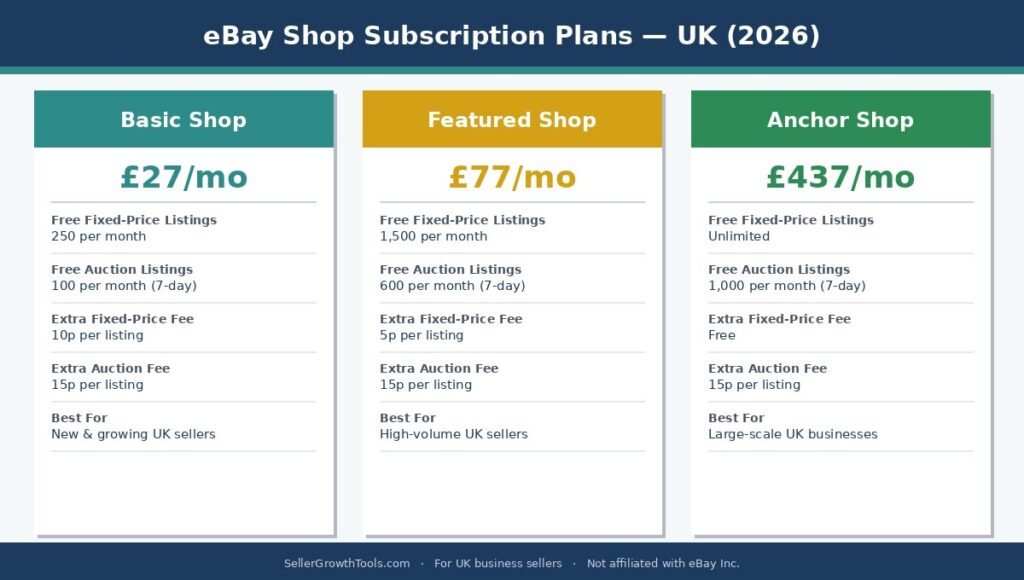
eBay.co.uk uses a different structure for UK business sellers. There are three Shop subscription tiers.
| UK Shop Plan | Monthly Subscription | Best For |
|---|---|---|
| Basic Shop | £27 | Regular sellers needing more listings |
| Featured Shop | £77 | High-volume UK sellers |
| Anchor Shop | £437 | Large-scale UK businesses |
UK private sellers operate under different fee rules compared with business sellers. If you are a UK private seller, the Shop subscription structure and the associated fee benefits are primarily designed for business accounts.
2026 UK fee update (business sellers): From 12 February 2026, eBay UK increased the per-order final value fee from £0.30 to £0.40 on orders above £10. This applies to UK business sellers (including Shop subscribers). UK private sellers are not charged per-order final value fees. Factor this into your per-sale cost calculations alongside the category-level final value fees.
What Do You Get With an eBay Store — Benefits Explained
Zero-Insertion-Fee Listing Allowances
Every eBay Store subscription includes a monthly allocation of listings you can create without paying an insertion fee. Once you exceed that allowance, a lower per-listing fee applies rather than the standard rate.
The tables below show the allowances confirmed from official eBay US and UK help pages.
US Store listing allowances (per month):
| Plan | Fixed-Price Listings (all categories) | Fixed-Price (select categories) | Auction Listings (select categories) | Extra Listing Fee |
|---|---|---|---|---|
| Starter | 250 — shared allowance (fixed-price + auction combined) | — | $0.30 | |
| Basic | 1,000 | 10,000 | 250 | $0.25 |
| Premium | 10,000 | 50,000 | 500 | $0.10 |
| Anchor | 25,000 | 75,000 | 1,000 | $0.05 |
| Enterprise | 100,000 | 100,000 | 2,500 | $0.05 |
UK Shop listing allowances (per month):
| UK Plan | Free Fixed-Price Listings | Free Auction Listings (7-day) | Extra Fixed-Price Fee | Extra Auction Fee |
|---|---|---|---|---|
| No Shop | Pay as you sell | Pay as you sell | 30p | 30p |
| Basic Shop | 250 | 100 | 10p | 15p |
| Featured Shop | 1,500 | 600 | 5p | 15p |
| Anchor Shop | Unlimited | 1,000 | Free | 15p |
These are the allowances from current official eBay help pages. Always verify the latest figures in your Seller Hub before subscribing, as eBay updates its fee schedules periodically.
US Starter note: The official eBay fee page shows a single figure of 250 for the Starter plan across both the fixed-price and auction-style columns. This appears to be a combined shared allowance rather than 250 per format. Check the current fee page or your Seller Hub to confirm how eBay applies this allowance to your listings.
US “select categories” note: Basic through Enterprise plans show higher allowances for certain categories (Collectibles, Clothing, Sports Trading Cards, Toys & Hobbies, Music, and others). Check the current US fee page for the full list of qualifying categories.
Reduced Final Value Fees in Eligible Categories
Some Store subscription tiers offer reduced final value fees on sales in eligible categories. This is separate from the insertion fee benefit and applies at the point of sale rather than at listing.
The saving depends on the category, the subscription level, and the sale price. Not all categories qualify, and the reduction varies by plan. Before subscribing, check the current fee schedule for your specific product categories to calculate whether the saving is meaningful for your business.
A Branded eBay Storefront
Your Store comes with a dedicated URL, a customizable header and banner, and the ability to organize your listings into categories that make sense for your products.
Buyers can browse your Store directly, which gives you a more professional presence on eBay compared with a standard seller profile. You can display your business name prominently, add a description, and organize products in a way that makes it easier for returning customers to find what they want.
Terapeak Research Tools
eBay offers two Terapeak tools, and understanding the difference matters:
Terapeak Product Research — free for all eBay sellers, with or without a Store subscription. It gives you access to historical sold data, sell-through rates, and pricing trends across eBay categories. This is the tool most sellers use for product research and competitive pricing.
Terapeak Sourcing Insights — this advanced tool, which shows demand patterns by category and helps you identify sourcing opportunities, requires a Basic Store subscription or higher. It is not available to non-Store sellers or Starter plan subscribers.
So while a Store subscription is not needed to use Terapeak Product Research, upgrading to Basic or above does unlock Sourcing Insights — which is the more powerful of the two tools for sellers actively making sourcing decisions.
For more on how to use these tools, see our eBay Terapeak Guide.
Promoted Listings Advanced and Seller Hub Promotions
It is worth understanding exactly which Promoted Listings features require a Store subscription and which do not.
Promoted Listings Standard — available to all Above Standard and Top Rated sellers with recent sales activity, regardless of Store subscription. This is the pay-per-sale ad format most eBay sellers are familiar with.
Promoted Listings Advanced — the cost-per-click (CPC) campaign type that gives you more control over budget, targeting, and ad scheduling than Standard. Eligibility requires being Above Standard or Top Rated with recent sales activity. Some sources indicate that a Store subscription is associated with earlier or broader access to Advanced campaigns, though eBay’s official eligibility pages focus on seller performance level rather than Store status as the primary requirement. If Advanced access is important to you, check your current eligibility in Seller Hub.
Seller Hub Promotions (Promotions Manager) — requires a Store subscription. This is the tool for running volume discounts, order discounts, and promotional events on your listings.
If you are already selling well with Standard Promoted Listings and want to move into keyword-targeted advertising or volume promotions, a Store subscription unlocks both of those features.
For a full breakdown of Promoted Listings fees and how the 2026 attribution model works, see our eBay Promoted Listings Guide.
Seller Hub Tools and Reporting
Store subscribers typically receive access to enhanced reporting and management tools within Seller Hub. Depending on the plan, this can include more detailed order management, listing automation options, and performance reporting.
Is an eBay Store Subscription Worth It?
The answer depends entirely on your numbers. There is no universal threshold — what makes a Store worthwhile for one seller may make it unnecessary for another.
The key question: Do the total monthly savings on insertion fees and final value fees exceed the subscription cost? If yes, the Store pays for itself. If no, you are paying for features rather than savings.
How to Calculate Whether a Store Is Worth It
Work through these steps before subscribing:
Step 1 — Count your monthly listings
How many new listings do you create each month, across all formats and categories? If this regularly exceeds the free allowance eBay provides to all sellers, insertion fee savings become relevant.
Step 2 — Estimate your insertion fee saving
Multiply your extra monthly listings by the standard insertion fee for your category. Compare that to the Store’s monthly cost.
Step 3 — Estimate your final value fee saving
If the Store plan you are considering offers reduced final value fees in your categories, estimate how much you would save per month based on your typical sales volume and average sale price.
Step 4 — Add the savings together and subtract the subscription cost
If the total saving exceeds the subscription fee, the Store is worth it on a financial basis alone — before considering the value of the storefront, Terapeak, or additional tools.
Worked Example (US Basic Store)
A seller creates 400 listings per month and generates $3,000 in monthly sales in eligible categories.
Monthly Basic Store cost: $27.95
Estimated insertion fee saving on extra listings: $30
Estimated final value fee saving in eligible categories: $25
Total estimated monthly saving: $55
Net benefit after subscription cost: $55 − $27.95 = $27.05 per month
This is an illustrative example. Actual results depend on eBay’s current fee schedule, category rules, and your specific listing and selling activity. Use our eBay Fee Calculator to estimate your actual figures.
When a Store Is Likely Worth It
A Store subscription tends to make financial sense when:
You consistently list more products each month than your free allowance covers
You sell regularly in categories that qualify for reduced final value fees under a Store plan
You want access to Terapeak Sourcing Insights (requires Basic or above) for category-level sourcing decisions
You sell enough volume that even a small reduction in the final value fee rate adds up meaningfully
When a Store May Not Be Worth It
A Store subscription may not be worth paying for when:
You sell occasionally or in small volumes
Your product categories do not qualify for the reduced final value fee rates
The total saving on fees is consistently less than the monthly subscription cost
You are still in an early, testing phase of your eBay business
How to Open an eBay Store
Setting up an eBay Store takes only a few minutes once you have decided which plan to choose.
Sign in to your eligible eBay seller account
Go to eBay’s Store subscription page and compare the available plans
Select the subscription tier and renewal term that suits your business
Review the terms and confirm your subscription
Customize your Store — add a business name, upload a banner or logo, and organize your listings into categories
Add a Store description so buyers can understand what you sell
Once your Store is active, all your existing and future listings will appear within it. Buyers can find your Store through your seller profile or through eBay search results.
A Store subscription does not automatically increase your account’s selling limits. Limits are managed separately through Seller Hub and are based on your account history and performance. See our eBay Selling Limits Guide for how limits work and how to request an increase.
US vs UK — Key Differences in eBay Store Subscriptions
| Feature | 🇺🇸 US (eBay.com) | 🇬🇧 UK (eBay.co.uk) |
|---|---|---|
| Number of plans | 5 plans Starter, Basic, Premium, Anchor, Enterprise |
3 plans Basic, Featured, Anchor |
| Entry-level plan | Starter — $4.95/mo (annual) | Basic Shop — £27/mo |
| Annual billing option | ✔️ Yes — saves vs monthly | Check eBay.co.uk current terms |
| Private seller eligibility | Eligible sellers can subscribe | Primarily for business accounts |
| Per-order fee (2026) | Varies by category | £0.40 per order above £10 Business sellers only (from Feb 2026) |
| Terapeak Product Research | ✔️ Free for all sellers | ✔️ Free for all sellers |
| Terapeak Sourcing Insights | Basic Store+ only | Basic Shop+ only |
| Cancellation policy | Check Seller Hub for current terms | 30-day minimum confirmed |
| Currency | USD ($) | GBP (£) |
Terapeak Product Research is free for all sellers on both eBay.com and eBay.co.uk. Terapeak Sourcing Insights requires a Basic Store or higher on both marketplaces. The specific fee reductions and listing allowances available with each plan differ between eBay.com and eBay.co.uk, so always check the current fee schedule on your own marketplace before subscribing.
Common Mistakes Sellers Make With eBay Store Subscriptions
Subscribing without calculating the break-even point
The most common mistake is subscribing to a Store because it sounds like it should save money, without actually running the numbers. If your listing volume and sales do not generate enough savings to cover the monthly fee, you are paying for a storefront you do not need yet.
Choosing a plan that is too high for current volume
A higher plan only makes sense when your savings on fees exceed the higher cost. Moving from Basic to Premium, for example, only benefits you if the additional listing allowances and fee reductions that come with Premium generate more than the extra monthly cost.
Ignoring the category fee rules
Not every product category qualifies for reduced final value fees under a Store subscription. If most of your sales are in categories that do not carry a fee reduction, the financial case for subscribing becomes much weaker.
Not reviewing your Store annually
eBay updates its fee schedules and Store benefits periodically. A Store that made sense when you first subscribed may no longer represent the best value — or, conversely, a plan upgrade may now be justified as your sales have grown.
eBay Store Subscription and Your Selling Costs
A Store subscription is one line item within a broader set of selling expenses. When calculating whether a Store is profitable for you, include all of the following:
Store subscription fee (monthly or annual)
Final value fees — standard or Store-reduced rate
Insertion fees on any listings that exceed your allowance
Promoted Listings ad spend, if applicable
Product sourcing costs
Shipping and packaging costs
Use our eBay Fee Calculator to estimate your total selling costs at different subscription levels. For a full breakdown of how eBay’s selling fees work in the US and UK, see our eBay Selling Fees 2026 Guide. To check whether individual products are profitable after all costs, use our eBay ROI Calculator.
Frequently Asked Questions
Is an eBay Store subscription mandatory?
No. Sellers can sell on eBay without a paid Store subscription, subject to the standard account and marketplace rules.
[H3] What is the cheapest eBay Store subscription?
On eBay.com, the Starter plan costs $7.95 per month on a monthly renewal or $4.95 per month when billed annually. On eBay.co.uk, the entry-level Business Shop plan starts at £27 per month.
Does an eBay Store subscription reduce selling fees?
Some Store tiers offer reduced final value fees in eligible categories. The exact saving depends on the subscription level, the product category, and the marketplace.
Can I cancel my eBay Store subscription?
Yes. For UK Shop subscriptions, eBay confirms a minimum 30-day commitment period — if you cancel within the first 30 days, you are billed for the full 30-day period; after that, fees are prorated. For US Store subscriptions, eBay’s cancellation help page does not specify a minimum period — check your current subscription terms in Seller Hub before cancelling.
In both markets, your Store benefits (listing allowances and reduced fee rates) stop on the first day of the month after you cancel, and standard fees then apply to new or renewed listings. Your Store settings are saved for 30 days after cancellation, giving you a window to reopen the Shop if you change your mind.
Does subscribing to an eBay Store increase sales?
Not automatically. Sales depend on demand, product quality, pricing, listing optimization, and competition. A Store improves your branding and listing capacity — it does not guarantee more buyers.
Can I cancel my eBay Store subscription?
Yes. For UK Shop subscriptions, eBay confirms a minimum 30-day commitment period — if you cancel within the first 30 days, you are billed for the full 30-day period; after that, fees are prorated. For US Store subscriptions, eBay’s cancellation help page does not specify a minimum period — check your current subscription terms in Seller Hub before cancelling.
In both markets, your Store benefits (listing allowances and reduced fee rates) stop on the first day of the month after you cancel, and standard fees then apply to new or renewed listings. Your Store settings are saved for 30 days after cancellation, giving you a window to reopen the Shop if you change your mind.
Does subscribing to an eBay Store increase sales?
Not automatically. Sales depend on demand, product quality, pricing, listing optimization, and competition. A Store improves your branding and listing capacity — it does not guarantee more buyers.
Does an eBay Store increase selling limits?
No. A Store subscription does not automatically raise the selling limits assigned to your account. Limits are managed separately and are based on your account history and performance metrics. See our eBay Selling Limits Guide.
Are US and UK Store subscriptions the same?
No. The available plans, prices, listing allowances, and fee reductions differ between eBay.com and eBay.co.uk. Always check the current terms for your own marketplace.
Does an eBay Store come with Terapeak?
Terapeak Product Research is free for all eBay sellers — you do not need a Store subscription to use it. However, Terapeak Sourcing Insights, which provides category-level demand data and sourcing intelligence, requires a Basic Store subscription or higher on both eBay.com and eBay.co.uk.
Can I switch between Store plans?
Yes. You can upgrade or downgrade your Store subscription through Seller Hub. Changes typically take effect from the next billing cycle, though this can vary depending on the timing and marketplace.
What happens to my Store if I cancel my subscription?
If you cancel, your Store and its customizations are removed. Your listings remain active but will revert to the standard non-Store fee structure. Any remaining listing allowances tied to the Store plan will also end.
How long does it take for an eBay Store to go live?
An eBay Store becomes active as soon as you confirm your subscription. You can begin customizing your storefront immediately after subscribing.
Related Guides & Tools
The full breakdown of eBay fees — what you pay before and after a Store subscription.
Calculate your estimated eBay fees and net payout with or without a Store subscription.
Check whether a product is profitable after all costs, including the Store subscription fee.
Store subscribers get additional Promoted Listings options — here’s how the fees work.
A Store does not raise your limits — this guide explains what does and how to request an increase.
How your account standing affects your eligibility for Store benefits and fee discounts.
Muhammad Usman
eCommerce & SEO Specialist
Muhammad Usman is an eCommerce and SEO specialist with hands-on experience managing eBay and other online marketplaces. He creates practical guides and free seller tools designed to help online sellers understand fees, shipping, profitability and day-to-day marketplace operations.
We use official eBay documentation as a primary source when researching seller policies, fees and requirements. More about this site · Get in touch