Every eBay sale comes with a mix of fees that can quietly eat into your profit — final value fees, per-order charges, promoted listings costs, and more. This free eBay fee calculator does the math for you instantly, covering every major category, Store subscription level, and both the US and UK marketplaces, so you always know your real payout before you list. Whether you need a quick eBay fees calculator for a single sale or a full eBay profit calculator to plan your pricing strategy, this tool handles both.
eBay Fee Calculator
See your real payout before you list. Enter your sale price and shipping — the numbers update as you type, just like a receipt.
Based on standard eBay 2026 fee rates for most categories, for US, UK, Canada, and Australia. Australia’s rate shown is the standard Pro-plan rate — sellers under AU$25,000 in annual sales may qualify for eBay’s free-selling tier, which is not modeled here yet. Some categories (motors, real estate, select collectibles) have different rates and caps — always confirm on eBay’s official Seller Fees page. Above the tier cap, eBay charges a reduced rate on the excess — this calculator accounts for that automatically.
In seconds, this calculator lets you:
✔️ Enter your sale price and shipping
✔️ Compare Store subscription levels
✔️ Estimate Promoted Listings fees
✔️ Find your break-even price
Contents
- Who Should Use This Calculator?
- How to Use This eBay Fee Calculator
- How eBay Fees Actually Work
- The eBay Fee Formula
- Beginner Example: A Simple Sale
- Advanced Seller Example: Store + Promoted Listings
- Fee Rates by Category
- Quick Reference: Fee Examples at Different Price Points
- Does an eBay Store Subscription Save You Money?
- Hidden eBay Fees Most Sellers Ignore
- Common eBay Selling Mistakes
- How to Increase Profit on Every Sale
- Why Most eBay Fee Calculators Fall Short
- How This Calculator Compares
- Promoted Listings: What They Really Cost You
- Selling Through Best Offer? Here’s What Changes
- eBay Fee Calculator: US vs UK
- 7 Tips to Reduce Your eBay Fees
- About SellerGrowthTools
- How This Calculator Is Updated
Who Should Use This Calculator?
This eBay fee calculator is built for:
New sellers who want to understand what eBay actually takes from a sale before listing their first item.
Established sellers comparing Store subscription tiers against their real monthly sales volume.
Resellers and flippers who need to know their break-even price before buying inventory.
US and UK sellers who want country-accurate rates instead of a generic global estimate.
Anyone using Promoted Listings or Best Offer who wants to see the real cost of those features before turning them on.
If you’re searching for an eBay seller fee calculator, an eBay profit calculator, or simply want to know how to calculate eBay fees for a specific sale, this tool covers all three in one place.
How to Use This eBay Fee Calculator?
Getting your exact payout takes less than a minute:
Enter your item price and any shipping you’re charging the buyer.
Choose your category — most items fall under “Most Categories,” but select a specific one if it applies (Athletic Shoes, Jewelry & Watches, Guitars & Basses, and a few others have different rates).
Select your Store subscription level — or “No Store” if you’re not subscribed.
Turn on any extras that apply — Best Offer, Promoted Listings, Top Rated Seller discount, or an international sale.
Read your payout instantly — the calculator updates live as you type, showing your final value fee, total eBay fees, eBay payout, and net profit after your own costs.
That’s it — no sign-up, no email required, and the numbers update in real time as you adjust any field.
How eBay Fees Calculator Actually Work?
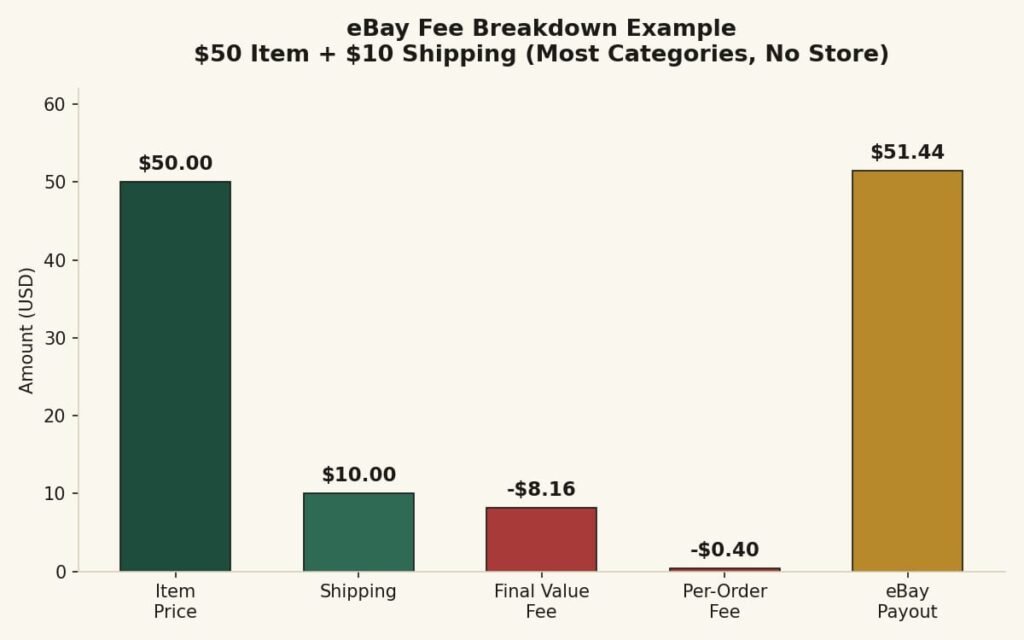
Every time you sell something on eBay, two main charges come out of your sale before the money reaches your bank account: the final value fee and the per-order fee.
The final value fee is a percentage of your total sale amount — that’s the item price plus whatever shipping you charge the buyer. For most categories, this rate is 13.6% in the US and 12.8% in the UK, though several categories have their own rates, which we cover below.
On top of that, eBay charges a flat per-order fee — $0.30 if your total sale is $10 or under, and $0.40 if it’s above $10. This fee applies once per order, not once per item, unless you’re selling identical items as separate individual orders.
Sales tax is a separate matter. In most US states and in the UK, eBay collects sales tax or VAT from the buyer and remits it directly to the relevant authority — it passes through your account but isn’t really your money, and eBay doesn’t charge you a fee on it the way it does on the item price and shipping.
Figure 1. Example of eBay fee breakdown for a $50 sale.
The eBay Fee Calculator Formula
If you’d rather calculate it by hand, here’s the exact formula this calculator runs behind the scenes:
Code
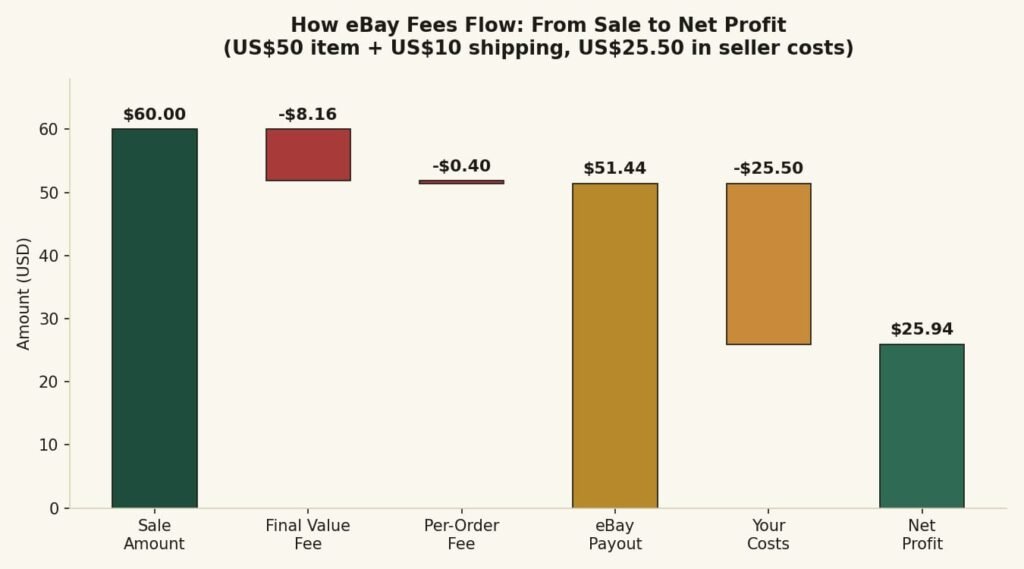
Once you know your net profit, two more numbers matter just as much: profit margin (net profit ÷ total sale, as a percentage) and break-even price (the lowest price you can sell at without losing money). The calculator above works out both automatically — no need to run this eBay break-even calculator math by hand.
How eBay fees affect your final profit.
Beginner Example: A Simple Sale
Let’s walk through a straightforward sale with no extras — no Store, no Promoted Listings, no Best Offer.
Scenario: You sell an item for $30 with $5 shipping, in the Most Categories group, with no Store subscription.
| Step | Amount |
|---|---|
| Item price | $30.00 |
| Shipping charged | $5.00 |
| Total sale amount | $35.00 |
| Final value fee (13.6%) | −$4.76 |
| Per-order fee | −$0.40 |
| eBay payout | $29.84 |
| Product cost | −$12.00 |
| Your shipping cost | −$4.00 |
| Packaging cost | −$0.50 |
| Net profit | $13.34 |
That’s a profit margin of about 38% — a healthy result for a simple, no-frills sale.
Advanced Seller Example: Store + Promoted Listings
Now let’s add real-world complexity: a Basic Store subscription and an 8% Promoted Listings ad rate.
Scenario: Item price $50, shipping $10, Promoted Listings at 8%, Basic Store subscription, Most Categories.
| Step | Amount |
|---|---|
| Item price | $50.00 |
| Shipping charged | $10.00 |
| Total sale amount | $60.00 |
| Final value fee (12.7% with Basic Store) | −$7.62 |
| Per-order fee | −$0.40 |
| Promoted Listings fee (8% of item price) | −$4.00 |
| Total eBay fees | −$12.02 |
| eBay payout | $47.98 |
| Product cost | −$20.00 |
| Your shipping cost | −$8.00 |
| Packaging cost | −$1.00 |
| Net profit | $18.98 |
Notice how the Store discount saves a little on the final value fee (12.7% instead of 13.6%), but the Promoted Listings fee eats into that saving and then some. This is exactly the kind of trade-off the calculator above helps you see clearly before you commit to running an ad on a listing.
Fee Rates by Category
Most items fall under eBay’s standard rate, but a handful of categories work differently:
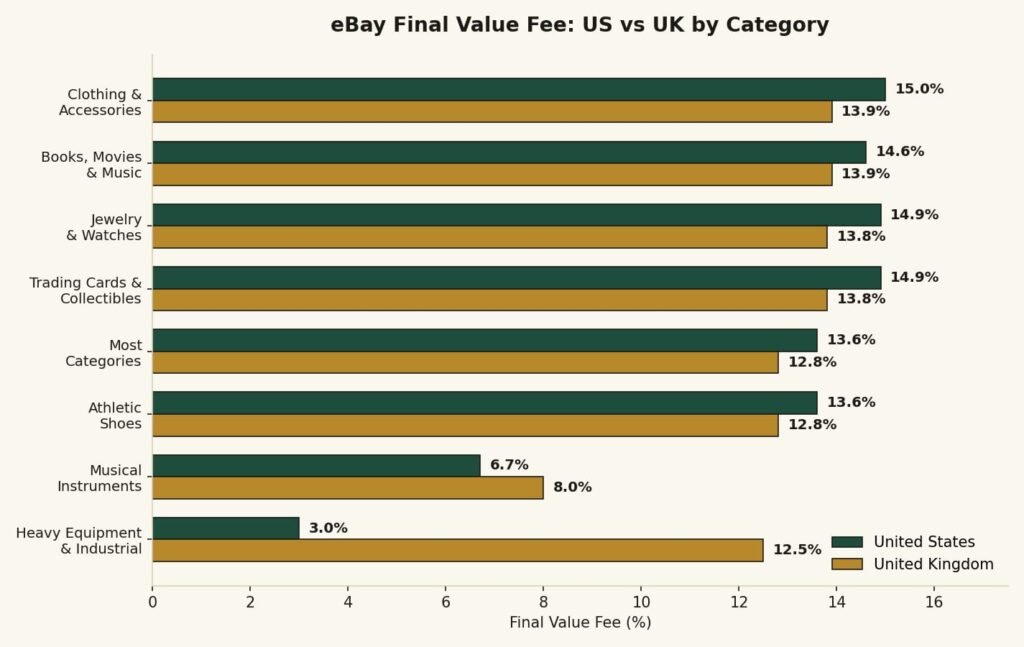
Most Categories (clothing, home goods, toys, general merchandise): 13.6% US / 12.8% UK
Books, Movies & Music: 15.3% US / 13.9% UK
Clothing, Shoes & Accessories: 15% US / 13.9% UK
Guitars & Basses: 6.7% US / 8% UK — one of the lowest rates on the platform (other musical instruments and gear fall under the standard rate)
Athletic Shoes (over $150): drops to 8% US, with no per-order fee
Trading Cards & Collectibles: 14.9% US / 13.8% UK
Jewelry & Watches: 14.9% US / 13.8% UK, with additional tiered rates on higher-value sales
Heavy Equipment & Industrial: 3% US / 12.5% UK — a rare case where UK sellers actually pay more
If your category isn’t listed here, 13.6% (US) or 12.8% (UK) is a safe default assumption. Rates change periodically, so always confirm the current number on eBay’s official fees page before pricing a high-value listing.
Figure 3. Comparison of eBay final value fee rates by category
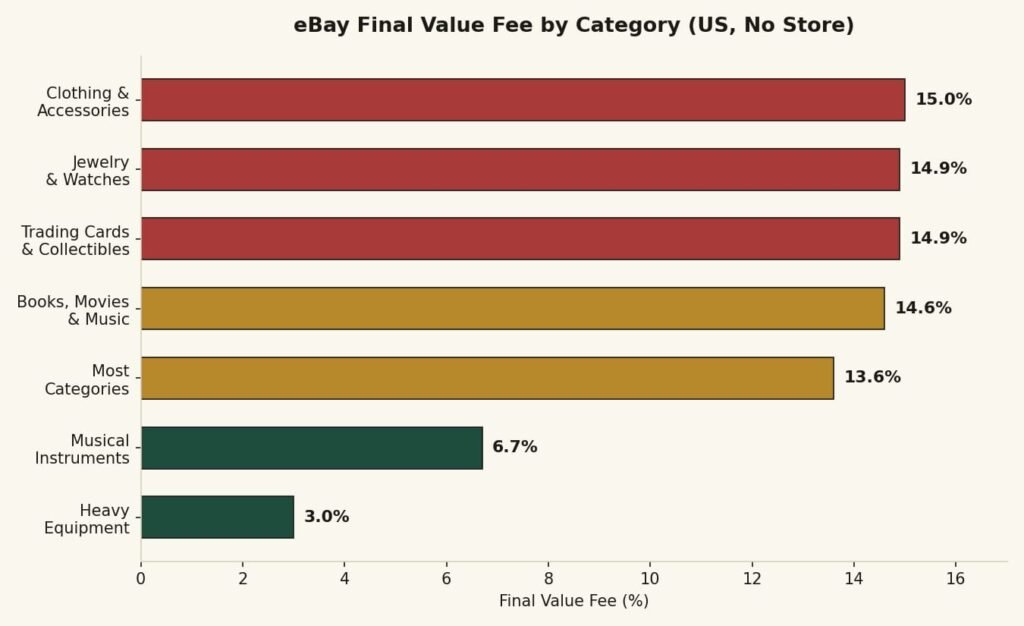
Figure 4. US vs UK eBay final value fee rates, side by side.
Quick Reference: Fee Examples at Different Price Points
For a fast eBay fee estimator without opening the calculator, here’s what Most Categories fees look like at common price points (US, no Store, no extras)
| Sale Price | Shipping | Total Sale | Final Value Fee | Per-Order Fee | Total Fees | Payout |
|---|---|---|---|---|---|---|
| $20 | $5 | $25 | $3.40 | $0.40 | $3.80 | $21.20 |
| $50 | $5 | $55 | $7.48 | $0.40 | $7.88 | $47.12 |
| $100 | $10 | $110 | $14.96 | $0.40 | $15.36 | $94.64 |
| $250 | $15 | $265 | $36.04 | $0.40 | $36.44 | $228.56 |
| $500 | $20 | $520 | $70.72 | $0.40 | $71.12 | $448.88 |
These figures assume the standard 13.6% rate with no Store discount, Promoted Listings, or other extras — use the full calculator above for your exact scenario.
Does an eBay Store Subscription Save You Money?
Only Basic Store and above get a discounted final value fee — typically about 0.9 percentage points off across most categories. Starter Store adds more free listings but does not lower your final value fee. Whether upgrading to Basic or higher is worth the monthly cost depends entirely on your sales volume.
As a rough guide: if you’re consistently selling more than $2,500–$3,000 a month, the fee savings alone usually cover the subscription cost. Below that, you’re often better off paying standard fees with no Store, or using Starter Store just for the extra free listings.
There’s a second, easy-to-miss detail: Store subscribers (Basic and above) get their discounted rate only up to a lower tiered-rate cap — $2,500 in the US, compared to $7,500 for non-Store and Starter sellers. Above that threshold, everyone pays the same reduced overage rate (2.35%). This means high-value sales don’t automatically favor having a Store — the calculator above accounts for this automatically.
Basic, Premium, Anchor, and Enterprise all get the same base discount — the difference between these tiers is mainly free listings and perks, not a bigger fee cut, though Anchor and Enterprise can unlock slightly better rates in a few specific categories.
| Tier | Approx. Monthly Cost* | Free Listings/Month | Final Value Fee Discount | Tiered-Rate Cap | Best For |
|---|---|---|---|---|---|
| No Store | $0 | 250 | None | $7,500 | Casual or low-volume sellers |
| Starter | ~$4.95 | 250 | None (listings only) | $7,500 | New sellers testing the waters |
| Basic | ~$21.95 | 1,000 | ~0.9 percentage points off | $2,500 | Regular sellers, $2,500+/month |
| Premium | ~$59.95 | 10,000 | ~0.9 percentage points off, plus extra perks | $2,500 | High-volume sellers |
High-volume sellers
Pricing varies by billing cycle and changes periodically — confirm current pricing in your eBay Seller Hub before subscribing.
Hidden eBay Fees Most Sellers Ignore
Beyond the headline final value fee, a few charges catch sellers off guard because they’re easy to overlook:
The fee on shipping, not just the item price. eBay charges its percentage on your total sale amount — item price plus shipping — so “charging for shipping separately” doesn’t reduce your fees the way some sellers assume.
Promoted Listings ad fees. These are optional but easy to leave switched on across your whole store without noticing the cumulative cost.
The UK regulatory operating fee. A small 0.42% charge on most UK business-seller transactions that isn’t always mentioned alongside the headline rate.
International sale surcharges. Selling to a buyer outside your home country typically adds an extra fee or currency conversion charge.
Insertion fees beyond your free allowance. If you list heavily and exceed your monthly free listings, each additional listing carries a small charge — whether or not it sells.
Non-refunded per-order fees. Even when a final value fee is refunded after a return, the original per-order fee is sometimes kept by eBay depending on the circumstances.
Common eBay Selling Mistakes
Pricing based on your listing price, not your accepted offer. If you regularly accept Best Offers, your real fee is based on the accepted price — pricing your margin around the listed price overstates your profit.
Ignoring the category-specific rate. Assuming every category charges 13.6% (US) or 12.8% (UK) can quietly cost you money in categories like Clothing & Accessories, where the rate is higher.
Subscribing to a Store without checking the math. A Store subscription only pays for itself past a certain sales volume — subscribing too early can mean paying more than you save.
Running Promoted Listings on thin-margin items. An 8–10% ad rate can turn a marginal sale into a loss if you haven’t checked the numbers first.
Forgetting packaging and “invisible” costs. Boxes, tape, and labels are small individually but add up across dozens of sales — leaving them out inflates your apparent profit.
Not recalculating for international buyers. A margin that works domestically can disappear once an international fee is added.
How to Increase Profit on Every Sale
Know your break-even price before you list, not after — use the calculator’s break-even feature to set a pricing floor.
Bundle low-value items to spread the flat per-order fee across a higher total sale amount.
Reassess your Store tier every few months as your sales volume changes, rather than setting it once and forgetting it.
Reserve Promoted Listings for items with real margin to advertise, not your entire catalog.
Counter Best Offers strategically instead of accepting the first offer that clears your absolute minimum.
Track your actual shipping cost against what you charge, since undercharging shipping is a common, quiet profit leak.
Revisit your category selection periodically, especially for items that might genuinely qualify for a lower-fee category like Guitars & Basses.
Why Most eBay Fee Calculators Fall Short
Picture this: you’ve just made a sale, you open a random “eBay fee calculator” you found on Google, punch in your numbers, and get a single flat percentage — no category selection, no Store subscription option, no mention of promoted listings or best offers. You close the tab still not sure what you’ll actually walk away with.
This is the exact frustration that pushed us to build this tool differently. Most free calculators online stop at “price × 13%” and call it done. But that’s not how eBay actually charges you. Your real fee depends on your category, whether you have a Store subscription, whether the item sold through a Best Offer, whether you’re running Promoted Listings, and even which country you’re selling in.
So instead of a single-number estimate, this calculator walks through your actual selling scenario — category by category, fee by fee — and shows you exactly where your money goes. Change your Store level and watch the numbers update. Toggle Promoted Listings on and see the real cost. Enter a Best Offer price and get fees calculated the way eBay actually calculates them, not the way a generic calculator assumes.
That’s the difference between a tool that gives you a number, and one that gives you your number.
How This eBay Fee Calculator Compares
| Feature | SellerGrowthTools | Typical Free Calculators |
|---|---|---|
| Category-specific rates | ✅ | ❌ (single flat rate) |
| Store subscription levels | ✅ | ⚠️ Sometimes |
| Best Offer support | ✅ | ❌ |
| Promoted Listings cost | ✅ | ❌ |
| Top Rated Seller discount | ✅ | ❌ |
| International sale estimate | ✅ | ❌ |
| US and UK support | ✅ | ⚠️ Usually one country only |
| Break-even price | ✅ | ❌ |
| Net profit (after your costs) | ✅ | ⚠️ Sometimes, payout only |
| Shareable results (URL/copy) | ✅ | ❌ |
Promoted Listings: What They Really Cost You
Promoted Listings is eBay’s pay-per-sale advertising program — you set an ad rate (typically 2% to 15%), and if a buyer clicks your ad and purchases within a set window, you pay that percentage on top of your regular final value fee.
The mistake a lot of sellers make is thinking of the ad rate as a small add-on. On a $50 sale with a 10% ad rate, that’s an extra $5 — often more than the per-order fee and close to half of your standard final value fee combined. Before turning on Promoted Listings, run your numbers through the calculator above with the toggle switched on, so you know your real margin, not just your listing price.
Selling Through Best Offer? Here’s What Changes
If you accept a Best Offer, eBay calculates your final value fee on the accepted offer price, not your original listing price. This catches a lot of sellers off guard when they price out a sale based on their listed price and then get a smaller payout than expected.
Use the Best Offer toggle in the calculator above to see your real numbers whenever you’re deciding whether to accept, counter, or decline an offer — it takes the guesswork out of the decision.
eBay Fee Calculator: US vs UK
| United States | United Kingdom | |
|---|---|---|
| Standard final value fee (no Store) | 13.6% | 12.8% |
| Basic Store+ final value fee | 12.7% | 12.3% |
| Per-order fee | $0.30 / $0.40 | £0.30 / £0.40 |
| Tiered rate cap (no Store) | $7,500 | £5,000 |
| Tiered rate cap (Basic Store+) | $2,500 | £5,000* |
| Rate above the cap | 2.35% | 2.35% |
| Extra fee | None | 0.42% regulatory operating fee (business sellers, most transactions) |
| International sale surcharge | ~1.65% (estimate) | ~2.5% currency conversion (estimate) |
*The US has a confirmed lower tiered-rate cap for Store subscribers ($2,500 vs $7,500). An equivalent UK Store-tier difference is not yet independently confirmed, so this calculator currently applies the same £5,000 cap for UK sellers — check eBay’s official UK fee page if you’re pricing a high-value item with a Store subscription.
The most important difference for UK sellers is the regulatory operating fee — a small additional charge that applies to most UK business-seller transactions. It’s easy to overlook since it’s not always mentioned alongside the headline fee percentage. If you’re specifically looking for an eBay fee calculator UK sellers can rely on, this tool switches its entire rate table — category rates, per-order thresholds, and the regulatory fee — the moment you select United Kingdom, so you’re never mixing US assumptions into a UK sale. The same applies in reverse for a US ebay fee calculator use case — switch to United States and every rate updates accordingly.
7 Tips to Reduce Your eBay Fees
Track your break-even price. Use the calculator’s break-even feature before you list, so you never price an item below what it actually costs you to sell.
Weigh a Store subscription against your actual volume. Don’t subscribe just because it sounds professional — run the math first.
Use Promoted Listings selectively. Reserve it for items with healthy margins, not everything in your store.
Watch your category. If an item genuinely fits a lower-fee category (like musical instruments at 6.7%), make sure it’s listed correctly — don’t assume “most categories” applies by default.
Factor shipping into your final value fee, not just your cost. eBay charges its percentage on the shipping you collect too, not just the item price.
Counter Best Offers instead of always accepting. A small counter can meaningfully change your post-fee payout.
Recalculate for international buyers. If you regularly sell overseas, the international fee adds up — check the estimate before assuming your domestic margin holds.
About SellerGrowthTools
SellerGrowthTools builds practical, free calculators for online sellers on eBay, Etsy, and TikTok Shop. Our tools are built directly from each marketplace’s official fee schedules, tested against real sale scenarios, and updated whenever a platform changes its pricing — so you’re working with current numbers, not guesswork.
How This eBay Fee Calculator Is Updated
This calculator and guide are checked against eBay’s official US and UK fee schedules on a regular basis. When eBay announces a rate change, category adjustment, or new fee, we update the tool and note the change here. The fee data version shown inside the calculator reflects the last date these rates were confirmed.
Last Updated: August 2026
Frequently Asked Questions
Does eBay charge fees on shipping?
Yes. The final value fee applies to your total sale amount, which includes both the item price and the shipping you charge the buyer — not just the item price alone.
Is there a fee for listing an item on eBay?
Most sellers get 250 free listings per month, so typically no. Beyond that free allowance, a small insertion fee applies per listing, though Store subscribers get a much higher free allowance.
Does eBay charge fees on sales tax?
No. Sales tax is collected and remitted by eBay directly to the relevant state or tax authority under marketplace facilitator laws — it isn’t included in your final value fee calculation.
What’s the difference between the final value fee and the per-order fee?
The final value fee is a percentage of your sale amount. The per-order fee is a small flat charge ($0.30 or $0.40) added once per order, regardless of the sale price.
Do I pay eBay fees if my item doesn’t sell?
No. Final value fees only apply to completed sales. Unsold listings don’t incur a final value fee, though very high listing volumes beyond your free allowance may incur insertion fees.
How much does an eBay Store subscription cost?
Pricing varies by tier and by whether you pay monthly or annually. The fee savings from the discounted rate typically become worthwhile once you’re selling more than roughly $2,500–$3,000 a month.
Do Store subscribers pay lower fees on every category?
Yes, the Store discount applies across virtually all categories, though the size of the discount can vary slightly by category.
Does free shipping reduce my eBay fees?
Not directly — eBay calculates the final value fee on the total sale amount, whether that’s item price plus separate shipping, or a higher item price with “free” shipping built in. The fee ends up nearly the same either way.
Does eBay charge fees after a refund?
In most cases, the final value fee is refunded when a sale is fully refunded, though the original per-order fee is sometimes non-refundable depending on the circumstances.
What is an eBay insertion fee?
An insertion fee is the cost of creating a listing beyond your monthly free allowance — it’s separate from the final value fee, which is only charged when an item actually sells.
Can I avoid Promoted Listings fees?
Yes — Promoted Listings is entirely optional. If you don’t enable it on a listing, you won’t pay an ad fee, though your item may get less visibility in search results.
How often do eBay fees change?
eBay typically reviews and adjusts fees a few times a year. This calculator is checked against eBay’s published fee schedule regularly and updated whenever a change is confirmed.
What’s the cheapest eBay category to sell in?
Guitars & Basses has one of the lowest standard rates at 6.7% in the US, followed by Heavy Equipment & Industrial at 3% — though both are narrow categories with limited relevance for most general sellers.
How do I eBay fee calculate by hand?
Multiply your total sale amount (item price plus shipping) by your category’s final value fee rate, then add the flat per-order fee. For a $50 item with $5 shipping at the standard 13.6% rate, that’s ($55 × 0.136) + $0.40 = $7.88 in total fees.
How do I calculate my eBay profit, not just my payout?
Your eBay payout only accounts for eBay’s fees. To get real profit, subtract your product cost, shipping cost, and packaging from that payout — exactly what the calculator’s “Net Profit” field does automatically, making it a full eBay seller profit calculator, not just a fee estimator.
Are PayPal or Managed Payments processing fees charged separately?
No — Managed Payments processing is built into eBay’s standard final value fee, so there’s no additional charge stacked on top for payment processing.
Does a Top Rated Seller badge actually lower my fees?
Yes — if you qualify for eBay’s Top Rated Seller program, you get a 10% discount on the variable portion of your final value fee. The per-order fee and any ad fees are not discounted.
Are eBay fees different for international sales?
Yes. When a buyer’s address is outside your home country, eBay typically adds an international fee or currency conversion charge on top of your standard final value fee.
Do UK sellers pay more in eBay fees than US sellers?
It depends on the category. The UK’s standard rate (12.8%) is actually slightly lower than the US rate (13.6%), but UK business sellers also pay a small additional regulatory operating fee on most transactions.
What happens to my fees if I sell an item through Best Offer?
Your final value fee is calculated on the accepted offer price, not your original listing price — so a lower accepted offer means a lower final value fee too, but also a lower payout overall.
Try the eBay Fee Calculator
Ready to see your exact numbers? Scroll back up and run your own sale through the calculator — adjust your category, Store level, and any promotions to get your real payout before you list.
Related Guides
Every charge explained — what sits behind the number this calculator gives you.
Work out profit, margin and the break-even price you can’t sell below.
Ad spend comes off the top — here’s how it changes the final figure.
Postage is charged a final value fee too. Most sellers forget that.
When the money actually lands in your account.
Reviewed By
Reviewed by the SellerGrowthTools Team
eBay Sellers · Marketplace Specialists · Tool Developers
Disclaimer
This calculator and guide provide estimates based on eBay’s published 2026 fee schedules and are intended for general informational purposes only. Actual fees may vary based on your specific account status, category exceptions, promotional terms, and future changes to eBay’s policies. Always confirm exact fees through your eBay Seller Hub or eBay’s official fees pages before making pricing decisions.