Quick Answer: eBay Managed Payments is eBay’s built-in payment system that processes buyer payments and sends payouts directly to sellers. It supports multiple payment methods, handles payment processing, and deposits your available funds into your linked bank account according to your selected payout schedule. Managed Payments doesn’t have a separate fee structure — the payment processing cost is already built into eBay’s Final Value Fee.
Key Takeaways
Managed Payments is eBay’s own payment processor — no separate seller account (like PayPal) is required
There’s no standalone “Managed Payments fee” — processing cost is already inside the Final Value Fee
Payout schedule can be daily, weekly, or monthly, and is fully seller-controlled
Funds move through two stages: Processing → Available, before they hit your bank
Identity and bank verification are required before your first payout.
Table of Contents
What Is eBay Managed Payments?
How Does eBay Managed Payments Work?
Benefits of eBay Managed Payments
Supported Payment Methods
eBay Payout Schedule
Available Funds vs Processing Funds
How to View Your Payout Details in Seller Hub
Payout Stages at a Glance
How to Set Up eBay Managed Payments
Common eBay Managed Payments Problems
How to Track Your Payouts
Tips to Get Paid Faster
Frequently Asked Questions
Related Guides
If you’ve sold on eBay recently, you’ve probably noticed something: there’s no separate PayPal step anymore. That’s because eBay now runs its own payment system — Managed Payments — handling everything from buyer checkout to the money landing in your bank account.
This guide walks through exactly how Managed Payments works, when you actually get paid, why a payout might say “processing” or “on hold,” and how to fix the most common payout problems sellers run into.
What Is eBay Managed Payments?
eBay Managed Payments is eBay’s own integrated payment processing system. Instead of buyers paying through a third-party processor like PayPal and eBay collecting fees separately, eBay now handles the entire transaction in-house — collecting the buyer’s payment, deducting its fees, and paying out the remaining balance directly to the seller’s linked bank account.
It rolled out across all major eBay marketplaces (US, UK, Canada, Australia, and others) and is now the default — and in most cases, only — way sellers get paid.
How Does eBay Managed Payments Work?
How Buyers Pay
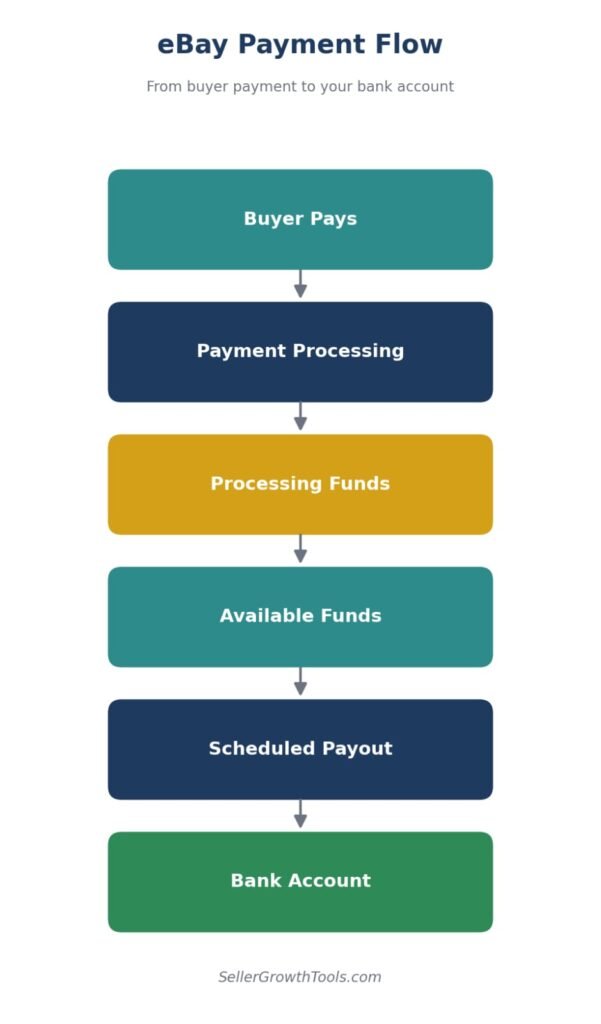
Buyers pay directly through eBay’s checkout using their preferred payment method — card, digital wallet, or a supported buy-now-pay-later option. eBay collects this payment on the seller’s behalf.
How eBay Processes Payments
Once a buyer pays, eBay processes the transaction, applies its Final Value Fee, and moves the remaining balance through a short processing period before it becomes available to withdraw.
How Sellers Receive Payouts
Once funds are marked “available,” eBay sends them to your linked bank account according to your chosen payout schedule (daily, weekly, or monthly).
Does eBay Managed Payments Charge Separate Fees?
No. eBay Managed Payments does not have a separate seller fee. Payment processing costs are already included in eBay’s Final Value Fee for most marketplaces. For a complete breakdown of exactly what eBay charges and how it’s calculated, see our eBay Fees Explained guide, or check the eBay Final Value Fee article for the exact percentage that applies to your category.
Benefits of eBay Managed Payments
One system for the whole transaction — no juggling a separate PayPal account
Faster, more predictable payout scheduling (daily/weekly/monthly, seller’s choice)
Wider range of payment methods available to buyers, which can improve conversion
All transaction and fee data in one place inside Seller Hub
Simplified reconciliation — no separate PayPal fee statements to cross-reference.
Supported Payment Methods
Credit & Debit Cards
The most common payment method buyers use at eBay checkout, supported across all major card networks.
Apple Pay
Available to buyers checking out on supported Apple devices for a faster checkout experience.
Google Pay
Similar to Apple Pay, offering a quick checkout option for Android and Chrome users.
PayPal (where available)
In some marketplaces, PayPal remains available as a payment option at checkout, even though eBay itself now processes the underlying transaction.
Buy Now, Pay Later Options
Installment-based payment options are available to buyers in supported regions, letting them split payments while you still get paid in full through your normal payout schedule.
eBay Payout Schedule
Daily Payouts
Funds that become available are sent to your bank account every day — the fastest option for sellers who want frequent cash flow.
Weekly Payouts
Available funds are batched and sent once a week, useful for sellers who prefer fewer, larger transfers.
Monthly Payouts
The least frequent option, bundling a full month of available funds into a single transfer.
How Long Does eBay Take to Send Money?
Once funds move from “processing” to “available,” the transfer to your bank typically takes a small number of business days, depending on your bank and payout schedule setting. New sellers may see slightly longer initial processing times while eBay verifies account history.
Available Funds vs Processing Funds
What Are Available Funds?
Money that has cleared eBay’s processing period and is ready to be paid out to your bank account on your next scheduled payout.
What Are Processing Funds?
Money from a recent sale that eBay is still verifying — typically tied to shipping confirmation or a short holding period after the sale completes.
Why Is My Payout Pending?
A payout usually shows as pending because funds haven’t finished processing yet, your bank/identity verification isn’t complete, or eBay has placed a temporary hold — often linked to account performance or a new-seller review period.
How to View Your Payout Details in Seller Hub
Open the Payments Tab
Log into Seller Hub and go to the Payments tab — this is the central hub for everything related to your money on eBay.
View Processing Funds
Inside Payments, a dedicated section shows funds still being verified, with the expected date each one will move to available.
View Available Funds
A separate section lists funds cleared and ready for your next scheduled payout, along with the payout date.
Download Payout Reports
Seller Hub lets you export payout history as a report — useful for bookkeeping, reconciling with your bank statement, or preparing tax records.
Payout Stages at a Glance
| Stage | Meaning | Can You Withdraw? |
|---|---|---|
| Processing Funds | Payment is still being verified | ❌ No |
| Available Funds | Ready for payout | ✅ Yes |
| Paid Out | Sent to your bank | ✅ Completed |
Warning Box
If your identity verification or bank verification is incomplete, eBay may delay or temporarily hold your payouts until the required information is provided.
How to Set Up eBay Managed Payments
Step 1 – Verify Your Identity
eBay requires standard identity verification (details vary by country) before releasing your first payout.
Step 2 – Add Your Bank Account
Link the bank account you want payouts sent to inside Seller Hub’s Payments section.
Step 3 – Choose Your Payout Schedule
Select daily, weekly, or monthly payouts based on how often you want funds transferred.
Step 4 – Complete Verification
Confirm any final verification steps eBay requests (small deposit confirmation, ID documents, etc.) to fully activate payouts.
Common eBay Managed Payments Problems
Payout On Hold
Usually tied to account performance issues, a new-seller review period, or a buyer dispute affecting the related order.
Bank Verification Failed
Often caused by mismatched account details — double-check the account name matches your registered eBay seller name exactly.
Payment Under Review
eBay occasionally reviews unusual transactions (high value, first-time buyer, or flagged activity) before releasing funds.
Negative Balance
Can happen after a refund, chargeback, or fee adjustment exceeds your current available balance — eBay will typically deduct the difference from your next payout.
Delayed Payout
Beyond normal processing time, delays are usually linked to bank processing times, incomplete verification, or a temporary account hold.
How to Track Your Payouts
You can track every payout’s status directly inside Seller Hub → Payments, where eBay shows a running breakdown of processing funds, available funds, and your payout history with exact dates and amounts.
Tips to Get Paid Faster
Verify your identity early, before you need your first payout
Keep tracking numbers uploaded promptly for every order
Ship on time to avoid processing holds tied to late shipping
Maintain good seller performance metrics
Keep your bank details updated and accurate
Avoid account restrictions that can trigger payout holds.
Who Processes eBay Payments?
eBay handles all payment processing itself through its Managed Payments system. There is no third-party processor — no PayPal, no Stripe, no separate payment gateway sitting between the buyer and your payout.
How it works
When a buyer pays — by card, Apple Pay, Google Pay, or any other accepted method — the money goes directly to eBay. eBay then deducts your selling fees and sends the remainder to your linked bank account.
The entire chain: buyer → eBay → your bank. No intermediary.
Why this matters for sellers
Before Managed Payments, sellers had to maintain a separate PayPal account and pay PayPal’s own processing fees on top of eBay’s fees. That double layer is gone. Your final value fee now includes payment processing — there’s no additional charge to calculate.
The practical effect: what you see in the fee breakdown is what you actually pay. No surprises from a second processor.
What eBay accepts from buyers
Credit and debit cards (Visa, Mastercard, Amex)
Apple Pay and Google Pay
PayPal (in most markets)
eBay gift cards and vouchers
The buyer’s payment method doesn’t affect your payout or your fees
Frequently Asked Questions
What is eBay Managed Payments?
eBay’s built-in payment system that processes buyer payments and sends payouts directly to sellers’ bank accounts, replacing the need for a separate PayPal-based checkout.
How long do eBay payouts take?
Once funds are marked available, transfers typically take a small number of business days depending on your bank and chosen payout schedule.
Can I still use PayPal?
In some marketplaces PayPal remains available as a buyer payment option at checkout, but eBay itself now processes the transaction and pays sellers directly — not PayPal.
Why is my payout pending?
Most commonly because funds are still in the processing period, verification isn’t complete, or eBay has placed a temporary hold on the account or transaction.
How do I change my payout schedule?
Go to Seller Hub → Payments → Payout Settings and select daily, weekly, or monthly.
Does eBay charge payment processing fees?
No separate fee — payment processing is already included within eBay’s standard Final Value Fee.
Can eBay hold my money?
Yes, temporarily — usually tied to new-seller review periods, performance issues, or disputes on a specific order. Holds are typically released once the underlying issue resolves.
How do I update my bank account?
In Seller Hub → Payments, you can add or update your linked bank account, which will require re-verification before payouts resume.
Related Guides
Related Guides
Payment processing has no separate fee — it’s inside the final value fee.
Work out your payout before the money lands.
How refunds are taken back out of your payouts.
What happens to funds on hold when an account is restricted.
Label costs come out of the same balance — plan for both.
CTA
Want to know exactly how much profit you’ll make after eBay fees?
👉 Try our FREE eBay Fee Calculator
👉 Calculate your profit with the eBay ROI Calculator
Conclusion
eBay Managed Payments consolidates the entire buyer-to-seller money flow into one system — no separate PayPal fees to track, no extra “payment processing” charge hiding in your statements. Understanding the difference between processing and available funds, picking the right payout schedule, and keeping your verification current is really all it takes to keep your payouts predictable and on time.
Author Box
Written by Muhammad Usman
eCommerce & SEO Specialist with 5+ years of experience in eBay, Amazon, Etsy and TikTok Shop. This guide is based on official eBay documentation and practical seller experience.
Fact-Checked Box
This guide has been reviewed against official eBay Seller documentation and updated for 2026. Features, payout schedules and payment options may vary by marketplace.