Planning a holiday, taking a short break, or stepping away from your eBay business for a few weeks? eBay Vacation Mode — officially called Time Away — lets sellers manage their listings and buyer expectations while they are unavailable to process orders normally.
You have two main options: keep eligible sales running with adjusted delivery estimates, or pause fixed-price sales entirely so buyers cannot purchase your items until you return.
This guide covers everything you need to know about eBay Vacation Mode in 2026 — how to turn it on and off, the difference between pausing and allowing sales, what happens to your listings, and how to avoid the most common mistakes sellers make when taking a break.
What Is eBay Vacation Mode?
eBay Vacation Mode is the informal name most sellers use for eBay’s Time Away feature. It is a built-in seller setting that allows you to schedule a period when you cannot process orders at your normal pace.
When you activate Time Away, eBay displays a notice to buyers on your listings and, depending on the option you choose, either adjusts expected delivery dates or temporarily hides your fixed-price listings from search results.
Time Away is available to sellers on eBay.com (US) and eBay.co.uk (UK), and does not require a paid Store subscription to use.
eBay Time Away vs Vacation Mode — What Is the Difference?
There is no functional difference — they refer to the same feature. “Vacation Mode” is the term sellers commonly use, while eBay’s official name for the setting is Time Away. You will find it labelled as Time Away inside your seller account settings.
Throughout this guide, both terms are used interchangeably.
How to Turn On eBay Vacation Mode — Step by Step
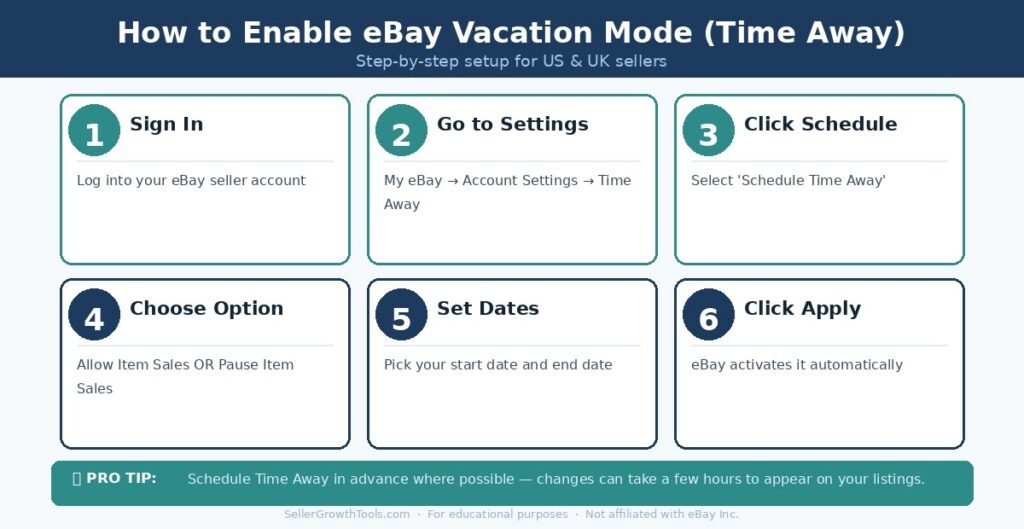
Activating Time Away takes a few minutes inside your eBay account. Here is how to do it:
- Sign in to your eBay seller account.
- Go to My eBay → Account Settings → Time Away.
- Click Schedule Time Away.
- Choose your preferred option: Allow Item Sales or Pause Item Sales.
- Select your start date and end date.
- Click Apply to save your settings.
If you schedule Time Away for a future date, eBay activates it automatically when that date arrives. You do not need to return to your account on the start date to trigger it manually.
✅ Before You Activate eBay Time Away
Complete these steps before enabling Time Away to avoid leaving buyers or orders unattended.
- Check all unshipped orders and arrange dispatch before you leave.
- Review active auction listings, as they continue running during Time Away.
- Respond to outstanding buyer messages and open requests.
- Choose between Allow Item Sales and Pause Item Sales.
- Set an automatic vacation message with your return date.
- Confirm your start and end dates, and schedule in advance where possible.
Pause Sales vs Allow Sales — Which Option Should You Choose?
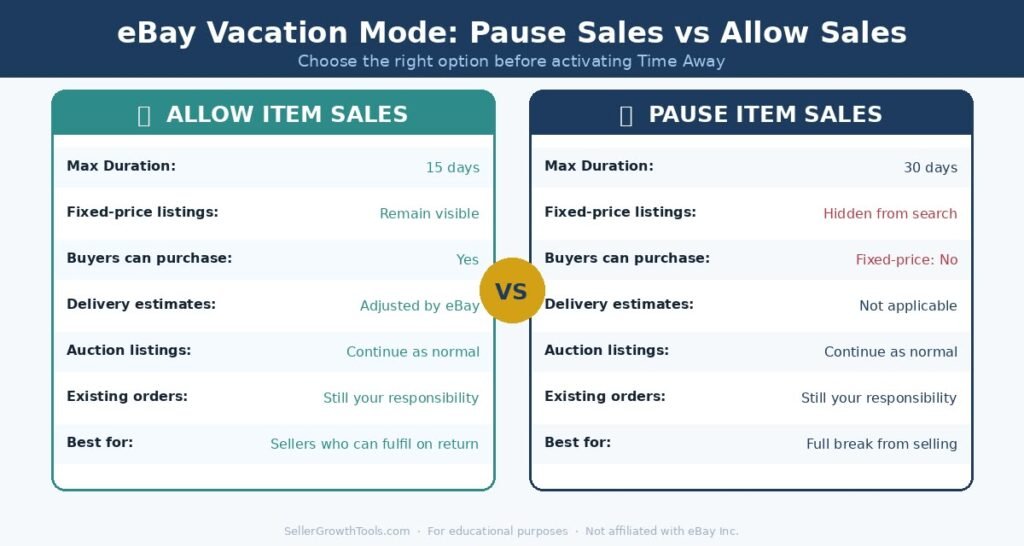
When setting up Time Away, you must choose between two options. The right choice depends on whether you can still fulfil orders during your break.
Allow Item Sales — Keep Selling While You Are Away
With this option, your eligible listings remain visible and buyers can continue purchasing from you. eBay displays a Time Away notice on your listings and adjusts applicable estimated delivery dates to reflect your absence.
Choose Allow Item Sales if:
You will have intermittent access to process orders, or someone can dispatch on your behalf
You want to keep making sales during your break and can fulfil them on return
Your break is 15 days or fewer
Key limit: Allow Item Sales is limited to a maximum of 15 days.
Pause Item Sales — Stop Fixed-Price Sales Temporarily
With this option, eBay temporarily hides your fixed-price listings from search results. Buyers cannot purchase those items until your Time Away period ends and your listings reappear.
Choose Pause Item Sales if:
You have no one available to dispatch orders during your break
You want to prevent new orders from being placed while you are away
You need up to 30 days of cover
Key limit: Pause Item Sales is limited to a maximum of 30 days.
Important note: Even with Pause Item Sales active, auction-style listings can remain live for bidding and purchase. Always review active auctions before taking a break.
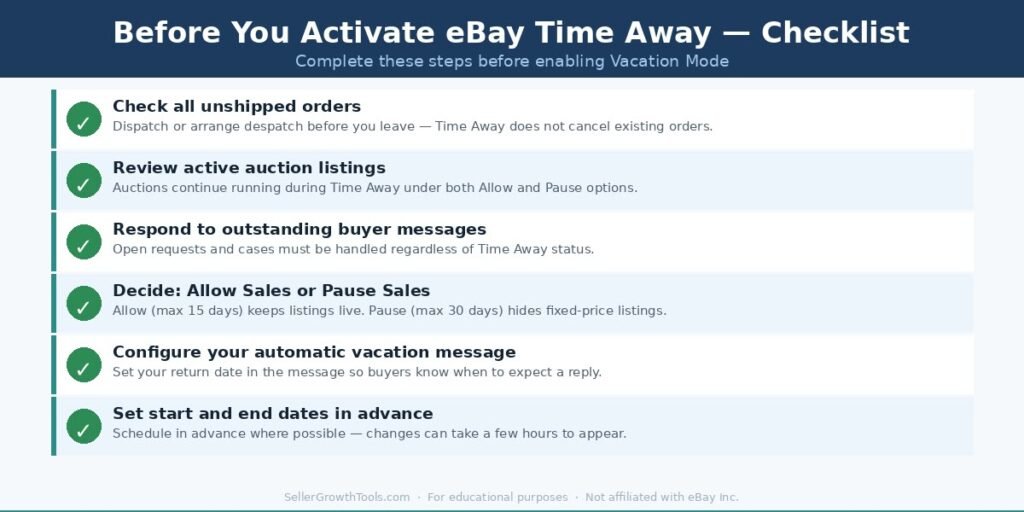
Pause Sales vs Allow Sales – Comparison Table
| Feature | Allow Item Sales | Pause Item Sales |
|---|---|---|
| Maximum Duration | 15 Days | 30 Days |
| Fixed-Price Listings Visible | ✔ Yes | ✖ Hidden from Search |
| Buyers Can Purchase Fixed-Price Items | ✔ Yes | ✖ No |
| Estimated Delivery Dates Adjusted | ✔ Yes (Eligible Listings) | Not Applicable |
| Auction Listings Continue | ✔ Yes | ✔ Yes |
| Existing Order Obligations Remain | ✔ Yes | ✔ Yes |
Note: Time Away does not cancel existing orders or pause active auction listings. Check eBay’s current policies for listing-specific exceptions.
How Long Can You Use eBay Vacation Mode?
The maximum duration of Time Away depends on which option you select:
Allow Item Sales: Up to 15 days per Time Away period
Pause Item Sales: Up to 30 days per Time Away period
For absences longer than 30 days, Time Away is not designed to cover the entire period. In that case, you should consider ending your listings, asking a trusted person to manage your account, or adjusting your listing quantities and handling times manually.
eBay’s Time Away feature is intended for temporary breaks, not extended periods of inactivity. If you leave active listings with unrealistic handling times for too long, it may affect your seller metrics and buyer experience.
What Happens to Your Listings During Time Away?
Fixed-Price Listings
When you allow sales, your fixed-price listings remain visible and purchasable. eBay adds a Time Away banner to your listings and adjusts the estimated delivery date where this is supported. Buyers can still see and buy your items, but they are informed that dispatch may be delayed.
When you pause sales, fixed-price listings are temporarily removed from eBay search results. Buyers cannot find or purchase those items through search. Once your Time Away ends, listings should reappear within a few hours — though in some cases this can take longer.
Auction Listings
Auction-style listings are not paused by either Time Away option. Auctions that are live when you activate Time Away will continue to run, accept bids, and end at their scheduled time. Buyers can still win and purchase auction items during your break.
This is one of the most common surprises for sellers. Before activating Time Away, review all active auctions and decide whether to let them run or end them early.
Existing Orders and Buyer Requests
Time Away does not cancel orders that were placed before you activated it. You remain responsible for:
Dispatching items from orders placed before your break started
Responding to open buyer requests and cases
Handling returns or refunds that arise during your absence
If you cannot fulfil pre-existing orders before leaving, contact the buyers and explain the situation. Late shipments on pre-existing orders can still affect your seller performance metrics.
How to Set an Automatic Vacation Message on eBay
You can set an automatic reply for buyers who message you through eBay while you are away.
Steps:
- Open your Time Away settings
- Scroll to Automatic Response
- Select Message When on Time Away
- Choose the dates the automatic reply should be active
- Write your message and click Apply
Example message:
“Thank you for getting in touch. We are currently away and will return on [date]. We will reply to all messages as soon as possible after we return. Thank you for your patience”.
Keep your message brief and professional. Include your expected return date so buyers know when to expect a response.
How to Turn Off eBay Vacation Mode
If you return earlier than planned, or want to cancel Time Away before the end date:
- Go to your Time Away settings in My eBay
- Select Cancel Time Away, or change the end date to today’s date
- Click Apply
- Check your listings — they may take a few hours to reappear in search results
- Review any messages or orders that came in while you were away
Once Time Away ends, your listings are restored to their previous state. There is no need to relist — they should reappear automatically.
Does eBay Vacation Mode Affect Seller Performance?
Used correctly, Time Away can help manage buyer delivery expectations by adjusting estimated delivery dates for eligible listings when Allow Item Sales is active. This may reduce the risk of late shipment defects on those eligible listings, but Time Away does not guarantee protection against late dispatch defects, buyer disputes, or other seller performance issues.
Time Away does not protect you from:
Late dispatch on orders placed before Time Away — you remain responsible for fulfilling any orders already placed before your break started
Cases opened by buyers during your break — open disputes and return requests must be resolved regardless of Time Away
Auction sales during your break — auctions that end while you are away create new order obligations you must fulfil
Listings excluded from delivery-date adjustments — certain offer transactions, digital items and local pickup listings are not covered
If your seller metrics are under pressure before you leave, resolve outstanding issues first. Time Away is a tool to help manage expectations, not a guarantee that performance metrics will be unaffected.
eBay Vacation Mode — Common Mistakes to Avoid
Forgetting Pre-Existing Orders
The most important thing to do before activating Time Away is checking for unshipped orders. Time Away does not pause obligations from orders already placed. Dispatch outstanding orders before you leave, or contact those buyers to explain the situation.
Assuming All Listings Are Paused
Even with Pause Item Sales active, auction listings continue running. Buyers can still bid and win auctions during your break. Check all active auctions before you leave and decide whether to let them run to completion or end them early.
Activating Time Away Too Late
Some settings take time to propagate across eBay’s platform. Schedule your Time Away a day in advance where possible, rather than activating it on the day you leave. This gives listings time to update and reduces the risk of buyers purchasing items with inaccurate delivery information in the transition period.
Ignoring Listing Exceptions
Not all listings receive automatic delivery date adjustments when Allow Item Sales is active. Certain offer transactions, digital items, and local pickup listings may be excluded. Check the current eBay help pages for the full list of exceptions if accurate delivery estimates matter for your business.
Assuming eBay Fees Pause Too
Your eBay fees do not stop during Time Away. Listing fees, Store subscription fees, and any applicable charges continue as normal. Time Away is a listing management tool, not a billing pause.
eBay Vacation Mode for UK Sellers — What to Know
The Time Away feature is available on eBay.co.uk and works in the same way as on eBay.com. UK sellers can access it through My eBay → Account Settings → Time Away.
Key points for UK sellers:
The same two options apply — Allow Item Sales and Pause Item Sales
Maximum durations are the same: 15 days (Allow) and 30 days (Pause)
Auction listings continue regardless of the option chosen
eBay UK business sellers should be aware that Time Away does not pause any subscription fees or per-order charges that may be ongoing
Time Away is a useful tool for any UK seller — whether a business seller or private seller — who wants to manage buyer expectations during a break.
Frequently Asked Questions
Is eBay Vacation Mode free?
Yes. Time Away is a standard seller account feature available to all eligible eBay sellers. There is no additional charge to use it. Note that your existing eBay fees — including Store subscription fees if applicable — continue during Time Away.
Can buyers still purchase items during Vacation Mode?
It depends on which option you choose. With Allow Item Sales, buyers can still purchase eligible fixed-price items. With Pause Item Sales, fixed-price listings are hidden and cannot be purchased. Auction listings remain active under both options.
Does Vacation Mode hide all my listings?
No. Pause Item Sales hides fixed-price listings from search results, but auction-style listings remain active regardless of which option you choose.
Can I use eBay Vacation Mode for 30 days?
Yes, when you select Pause Item Sales. The Allow Item Sales option is limited to 15 days. If you need more than 30 days, Time Away is not designed to cover that period.
Does Vacation Mode automatically extend my shipping time?
When you choose Allow Item Sales, eBay adjusts estimated delivery dates for eligible listings. However, not all listing types receive this adjustment — exceptions include certain offer transactions, digital items, and local pickup listings.
Can I cancel Time Away early?
Yes. Go to your Time Away settings and either select Cancel Time Away or change the end date to an earlier date. Listings should reappear in search within a few hours.
Does eBay Vacation Mode cancel existing orders?
No. Time Away does not cancel any orders already placed. You remain responsible for fulfilling those orders and responding to any related buyer requests.
Do I need an eBay Store to use Time Away?
No. Time Away is available to eligible sellers regardless of whether they have a paid Store subscription.
What happens to my auctions during Time Away?
Auction listings continue to run normally during Time Away under both the Allow and Pause options. Buyers can still bid and purchase auction items while you are away. Review active auctions before activating Time Away.
Will my listings reappear automatically when Time Away ends?
Yes. When your Time Away period ends, paused fixed-price listings should reappear in search results automatically. This can take a few hours in some cases. You do not need to relist them manually.
Does eBay Vacation Mode Affect Search Rankings?
When you select Pause Item Sales, eligible fixed-price listings are temporarily hidden from eBay search results. Once Time Away ends, those listings can become visible again. However, eBay does not guarantee that they will return to exactly the same search positions they held before your break.
If you choose Allow Item Sales, eligible listings remain available for purchase, but their search positions may still change due to competition and other factors.
Related Guides & Tools
How late shipments and defects affect your account — and what Time Away can and cannot protect you from.
Calculate your shipping costs before and after your break to stay profitable on orders placed during Time Away.
Store subscription fees continue during Time Away — find out whether a Store subscription is worth the cost.
A full breakdown of what eBay charges — none of which pauses during your Time Away period.
What to do if you return from Time Away to find an unpaid order waiting — steps and timelines explained.
Muhammad Usman
eCommerce & SEO Specialist
Muhammad Usman is an eCommerce and SEO specialist with hands-on experience managing eBay and other online marketplaces. He creates practical guides and free seller tools designed to help online sellers understand fees, shipping, profitability and day-to-day marketplace operations.
We use official eBay documentation as a primary source when researching seller policies, fees and requirements. More about this site · Get in touch