Selling products in multiple sizes, colors, styles, or materials on eBay can become complicated when you create a separate listing for every option. Managing individual listings takes time, increases the chances of inventory mistakes, and can make it harder for buyers to find the exact version they want. An eBay variation listing allows you to offer different versions of the same product under one eligible fixed-price listing. Instead of publishing separate listings for every T-shirt size or color, you can create one listing where buyers select their preferred combination. For example, imagine selling a cotton T-shirt available in four colors and five sizes. With out variations, you might need to manage up to 20 individual listings. With an eligible variation listing, those combinations can appear together on one product page. This feature is useful for sellers on eBay.com (United States) and eBay.co.uk (United Kingdom), although supported categories, variation attributes, and listing interfaces can differ. This guide explains the complete setup process, including product attributes, stock, prices, photos, common errors, listing limits, and practical tips for US and UK sellers.
Quick Answer: How to Create an eBay Variation Listing
To create an eBay variation listing, sign in to your seller account, open the listing tool, choose a category that supports variations, and select the Fixed Price (Buy It Now) format. Then locate Variations, choose relevant attributes, enter the available combinations, and assign prices and quantities.
- Sign in to eBay Seller Hub.
- Select Create Listing.
- Choose an eligible product category.
- Select Fixed Price (Buy It Now).
- Open the Variations section.
- Add attributes such as Size and Colour.
- Create the available combinations.
- Enter prices and stock quantities.
- Add accurate product and variation photos.
- Complete item specifics and description.
- Configure shipping and return settings.
- Review and publish the listing.
The exact button names and layout may vary by marketplace and listing-tool version.
What Is an eBay Variation Listing?
An eBay variation listing is a fixed-price listing that lets buyers choose between different versions of the same product. The core product remains the same, but certain attributes vary, such as size, colour, material, style, pattern, or width. Each available combination can have its own price and quantity.
How Do eBay Variations Work?
Suppose you sell one T-shirt design in Black, White, and Navy Blue, with sizes Small, Medium, Large, and Extra Large. These choices produce 12 possible combinations. When a buyer selects a colour and size, the listing presents the corresponding available option. You should only configure combinations that you actually stock.
Example: A T-Shirt Variation Listing
| Colour | Size | US Price | UK Price | Stock |
|---|---|---|---|---|
| Black | Small | $14.99 | £14.99 | 10 |
| Black | Medium | $14.99 | £14.99 | 8 |
| White | Small | $15.99 | £15.99 | 12 |
| White | Medium | $15.99 | £15.99 | 6 |
| Navy | Large | $16.99 | £16.99 | 5 |
US and UK prices above are separate illustrative examples, not currency conversions.
Benefits of Using eBay Variation Listings
Manage Multiple Options in One Listing
Instead of editing many separate listings, you can manage different eligible versions of one product together. This is especially useful for clothing, footwear, accessories, and home products.
Make Product Selection Easier for Buyers
A clear size or colour selector helps buyers compare available options without opening multiple product pages. It also reduces confusion about which version they are ordering.
Track Inventory by Variation
You can assign an available quantity to each combination. For example, you might have ten Black/Medium shirts but only three Black/Large shirts. Keep these figures updated to help avoid overselling.
Offer Different Prices Where Appropriate
Some sizes, materials, or styles cost more to source or ship. A variation listing can support different prices for different combinations. Price each option based on its actual cost and your marketplace fees.
Tip: Use the eBay Fee Calculator to work out the exact fee for each price point before you publish.Reduce Repetitive Listing Work
Products that share core details may be easier to maintain in one listing. However, separate listings may still be more suitable for substantially different products or unsupported categories.
eBay Variation Listing vs Multi-Quantity Listing
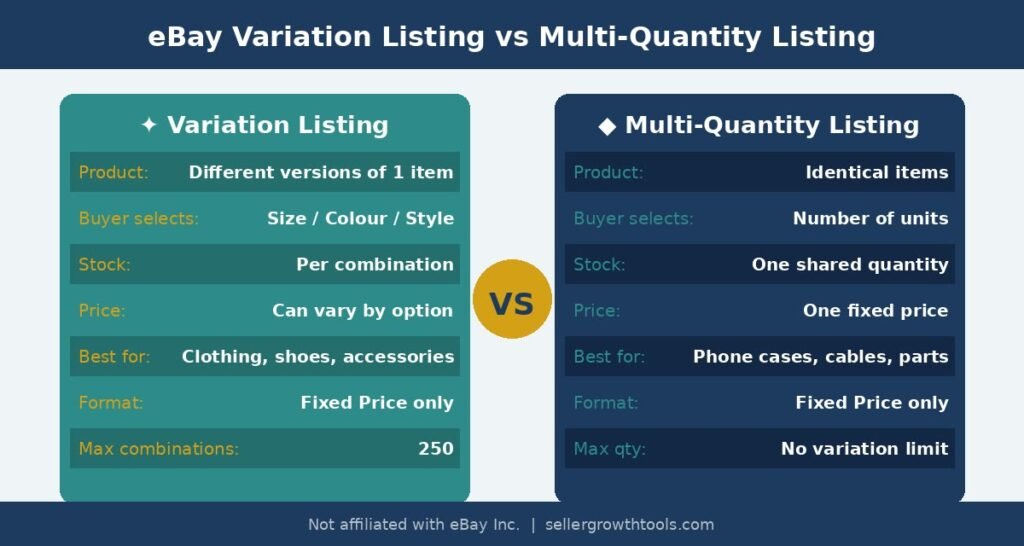
If you want to list multiple items in one listing on eBay, first decide whether the items are identical or different versions of the same product.
| Feature | Multi-Quantity Listing | Variation Listing |
|---|---|---|
| Product type | Identical items | Versions of one product |
| Buyer chooses | Number of units | Size, colour, or other supported option |
| Stock | One item quantity | Quantity per combination |
| Price | One item price | May vary by combination |
| Format | Fixed price | Fixed price |
When to Use a Multi-Quantity Listing
If you have 50 identical black phone cases for the same phone model, create one fixed-price listing and enter a quantity of 50. Buyers choose how many units to purchase. No variations are necessary.
When to Use a Variation Listing
If the same T-shirt design comes in different colours and sizes, an eligible variation listing allows buyers to choose the correct combination. Do not combine unrelated products just to avoid listing fees or attract searches.
Do not combine unrelated products as variations. Variations must represent legitimate options of the same core product. Violating this policy can result in listing removal or account restrictions.
How to Create an eBay Variation Listing in 2026: Step-by-Step
Step 1: Sign In to eBay Seller Hub
Sign in at ebay.com if you sell on the US marketplace or ebay.co.uk if you sell on the UK marketplace. Open Seller Hub, go to Listings, and choose to create a new listing. The button label can vary between interfaces. A desktop browser is often easier for reviewing many combinations.
Step 2: Choose the Correct Product Category
Enter an accurate product description, such as Men’s Cotton Crew Neck T-Shirt, and select the category that best fits the item. Variation support depends on category. Never choose an unrelated category merely to gain access to variation fields.
Step 3: Select Fixed Price (Buy It Now)
In the pricing or listing-format area, select Fixed Price / Buy It Now instead of Auction. Variation listings use the fixed-price format. Changing the format may reveal variation options when the category supports them.
Step 4: Locate the Variations Section
Find the Variations area in the listing form. Depending on the interface, you may see Create Variations, Add Variations, or Edit Variations. Open it and review the attributes available for your category.
Step 5: Add Variation Attributes
Select relevant attributes such as Colour and Size. For example, Colour: Black, White, Navy Blue; Size: Small, Medium, Large, Extra Large. Choose clear labels and accurate values. Do not use unrelated keywords as variation labels.
Step 6: Create Available Combinations
Review the generated combinations and remove or disable combinations you do not actually sell. If White/Large is not available, do not leave it purchasable. Ensure every displayed combination corresponds to a real product option.
Step 7: Set a Price for Each Variation
Enter the correct price for each combination. Different sizes or materials can have different costs. Before pricing, consider purchase cost, marketplace fees, shipping, packaging, advertising, and desired margin.
💡 Before you set prices: Use the eBay Fee Calculator to check your exact fees, and the eBay Selling Fees 2026 Guide to understand the full fee structure — US and UK fees are not identical.Step 8: Set Inventory Quantities
Enter accurate quantities for every available combination. For example, Black/Small 10 units, Black/Medium 8 units, White/Small 12 units, and Navy/Medium 4 units. Update inventory after sales or restocking, particularly if you sell through more than one channel.
Step 9: Upload Product and Variation Photos
Use clear, well-lit photographs of the actual products. Where supported, associate photos with relevant variation values. A buyer choosing Navy Blue should see images accurately representing that option. Include useful angles, close-ups, and a size chart where appropriate.
Step 10: Complete Item Specifics and Description
Fill in required category details such as brand, type, department, material, pattern, fit, and condition where applicable. Describe what buyers receive. Example: Men’s Cotton Crew Neck T-Shirt; available in selected colours and sizes; classic crew-neck design; short sleeves. Ask buyers to choose their size and colour before ordering. Only include product claims that are true.
Step 11: Configure Shipping and Return Settings
Review delivery services, handling time, shipping charges, and return settings for your marketplace. If you use eBay Business Policies, assign the appropriate shipping, payment, and return settings. Business Policies do not replace the variation setup itself.Step 12: Review and Publish
Check the category, format, title, variation combinations, prices, quantities, images, item specifics, shipping, and returns. Publish only when the details are accurate. Then open the live listing as a buyer and test the variation menus.
Sample Variation Price and Quantity Setup
| Variation | US Price | UK Price | Quantity |
|---|---|---|---|
| Black / Small | $14.99 | £14.99 | 10 |
| Black / Medium | $14.99 | £14.99 | 8 |
| White / Small | $15.99 | £15.99 | 12 |
| Navy / Medium | $16.99 | £16.99 | 4 |
All prices are examples only; they are not exchange-rate equivalents or pricing recommendations.
How Many Variations Can You Add to an eBay Listing?
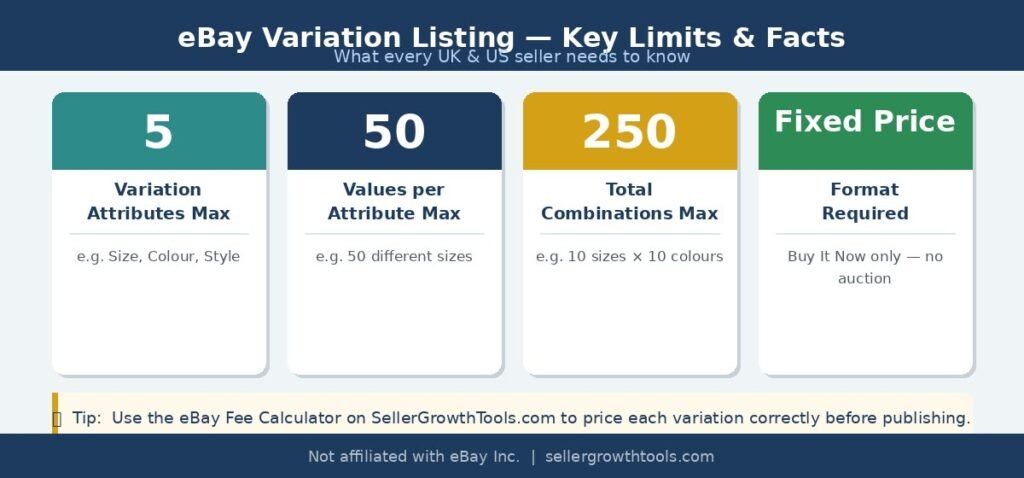
eBay’s published variation-listing guidance describes these general maximums for eligible listings. Category-specific rules and listing-tool behaviour may differ.
| Feature | General Maximum |
|---|---|
| Variation attributes | 5 |
| Values per attribute | 50 |
| Variation combinations | 250 |
| Pictures per variation | Up to 24, where supported |
For example, 10 sizes multiplied by 10 colours produces 100 possible combinations. You should offer only the combinations that genuinely exist, and the total must stay within the applicable limit.
How to List Multiple Items in One Listing on eBay
For identical products, a standard multi-quantity listing is simpler. Create a fixed-price listing, enter the product details and one item price, and set the Quantity field to the number of identical units available.
For example, 40 identical USB cables can be sold through one listing with quantity 40. If the cables have different supported lengths, a variation listing may be suitable.
Can You Add Variations to an Existing eBay Listing?
Editing an Existing Variation Listing
If a listing already contains variations, you may be able to revise certain prices, quantities, photos, or options. The allowed edits can depend on listing activity and eBay’s revision rules.
Converting a Standard Listing to a Variation Listing
An ordinary listing without variations generally cannot be converted simply by editing it. You may need to create a new eligible variation listing. Before replacing an existing listing, review active orders, offers, and other listing activity.
Why Can’t I Add Variations on eBay? Common Problems and Fixes
Variations Option Is Missing
The selected category may not support variations. Verify the correct category and supported attributes.
The Listing Is Set to Auction
Variations require an eligible fixed-price listing. Switch to Buy It Now where permitted.
You Cannot Convert an Existing Listing
A standard listing without variations may not be eligible for conversion. Create a new eligible variation listing if necessary.
Variation Attributes Are Rejected
The attribute or value may not be supported by the category. Use appropriate supported fields.
Too Many Variation Combinations
The listing may exceed applicable limits. Remove unnecessary combinations.
Prices or Quantities Are Missing
Check each available combination and complete its required price and quantity fields.
Variation Photos Do Not Match
Review how photos are associated with the variation values and ensure images represent the selected product.
Listing Changes Will Not Save
Read validation messages, save a draft if possible, try a supported browser, and consult eBay support if the problem persists.
eBay Variation Listing Best Practices
Write a Clear Product Title
Use an accurate shared-product title such as “Men’s Cotton Crew Neck T-Shirt — Multiple Colours and Sizes.” Avoid unrelated keywords.
Complete Relevant Item Specifics
Provide correct details that help buyers understand the product and choose the right option.
Use Understandable Variation Labels
Prefer supported labels such as Size, Colour, and Style rather than vague options.
Keep Stock Updated
Update quantities after sales and restocking to reduce overselling and cancellations.
Match Photos to the Selected Product
Use photos that clearly show the correct colour, style, and material.
Calculate Profit Before Setting Prices
Consider the cost and fees for each variation and each marketplace. Use the eBay Fee Calculator and eBay ROI Calculator to check margins before you publish.Review Shipping and Return Settings
Confirm the policies assigned to the listing accurately reflect how you fulfil orders. Use eBay Business Policies to manage reusable shipping, payment, and return templates.Test the Live Listing
Open the published page and select several combinations to confirm prices, images, and availability.
Do eBay Variation Listings Help SEO?
A variation listing can improve the shopping experience by making relevant product options easier to select. However, eBay does not guarantee that variation listings rank higher than separate listings. Search visibility may depend on relevance, title, category, item specifics, price, shipping offer, seller performance, buyer experience, and competition. Prioritise accurate listing information over unsupported ranking promises.
Common eBay Variation Listing Mistakes to Avoid
- Combining unrelated products in one variation listing
- Selecting an inaccurate category to enable variations
- Using Auction format instead of an eligible fixed-price format
- Offering unavailable combinations or incorrect quantities
- Using misleading product photos or unclear variation labels
- Forgetting to review different variation prices and shipping costs
- Assuming all categories and marketplaces have identical settings
- Publishing without testing the live listing
eBay Variation Listing Checklist
Use this checklist before publishing your variation listing:
✅ Pre-Publish Variation Listing Checklist
Frequently Asked Questions
How do I create an eBay variation listing in 2026?
Create a new fixed-price listing in a category that supports variations. Add attributes and available combinations, set prices and quantities, upload photos, review, and publish.
How do I add sizes and colours to an eBay listing?
Open Variations on an eligible listing, select Size and Colour where supported, and enter the available values and combinations.
Can I list multiple items in one eBay listing?
Yes. Use multi-quantity for identical items or an eligible variation listing for different versions of one product.
How many variations can an eBay listing have?
eBay’s published guidance allows up to 250 variations in one eligible listing, subject to category and attribute restrictions.
Can each variation have a different price?
Yes. Supported combinations can have their own prices and quantities.
Why can’t I add variations to my eBay listing?
Common causes include unsupported categories, Auction format, conversion restrictions, or invalid attributes.
Can I add variations after publishing?
You may be able to revise an existing variation listing, subject to eBay’s rules. Converting a standard listing generally requires creating a new listing.
Are eBay variation listings free?
There is generally not a separate fee for each variation within an eligible listing, but standard listing fees, optional upgrades, and selling fees can apply.
Can I create an eBay variation listing on my phone?
Some options differ between mobile and desktop tools. If settings are unavailable on mobile, try Seller Hub in a desktop browser.
Do variation listings rank higher on eBay?
Not necessarily. There is no guaranteed search-ranking advantage solely from using variations.
Can UK sellers use variation listings?
Yes, eligible sellers on eBay.co.uk can create them in supported categories.
Can each variation have different shipping costs?
Do not assume that each variation can have an independent shipping policy. Review the listing tool’s supported shipping settings.
Can I combine completely different products as variations?
No. Variations should represent legitimate options of the same product.
Can I use variations for different product conditions?
Do not assume item conditions can be grouped as variations. Follow category-specific rules; separate listings may be needed.
What should I do if a variation sells out?
Update its stock or availability so buyers cannot purchase an unavailable combination.
Conclusion
Creating an eBay variation listing in 2026 can make selling products in multiple sizes, colours, and styles easier to manage. The key is to choose a supported category, select the fixed-price format, configure legitimate combinations, enter accurate prices and quantities, and review your listing carefully.
For US and UK sellers, the broad process is similar, although marketplace-specific policies and interfaces can differ. Use a multi-quantity listing when items are identical; use variations when buyers need to select between legitimate options of the same product. Always test the live listing after publishing.
Related eBay Guides and Free Tools
📚 Related eBay Guides & Free Tools
- 📄 eBay Selling Fees 2026 Guide
Complete breakdown of eBay fees for UK & US sellers - 🔢 eBay Fee Calculator
Estimate fees and potential profit for each variation - 📊 eBay ROI Calculator
Review product costs and return on investment - 🚚 eBay Shipping Calculator
Compare carrier rates for different product sizes - ⚙️ eBay Business Policies Guide
Set up reusable shipping, payment, and return policies - ⚖️ eBay vs Amazon Guide
Compare the two selling marketplaces side by side
Multi-Quantity Listings and Listings With Variations
Muhammad Usman is an eCommerce and SEO specialist with hands-on experience managing eBay, Amazon, and other online marketplaces. He creates practical guides and free seller tools designed to help online sellers understand fees, shipping, profitability and day-to-day marketplace operations.
We use official platform documentation as a primary source when researching seller policies, fees and requirements. More about this site
Get in touch