If you sell on eBay and manage more than a handful of listings, eBay Business Policies can save you a significant amount of time. Instead of setting shipping, payment and return details individually for every listing, you create reusable policy templates and apply them across as many listings as you need.
This guide explains how eBay Business Policies work, how to set them up on eBay.com (US) and eBay.co.uk (UK), what UK sellers need to know about consumer law and return requirements, and the key differences between how policies work on each marketplace.
How to Set Up eBay Business Policies
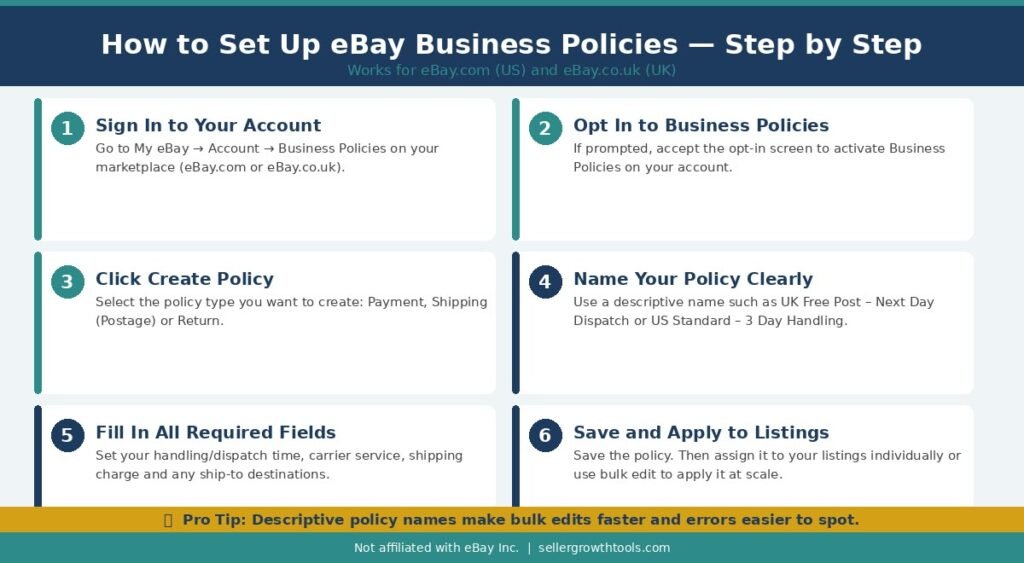
To set up eBay Business Policies, sign in to your eBay account and go to My eBay → Account → Business Policies. If prompted, opt in to the feature. Select Create policy, choose Payment, Shipping (Postage in the UK), or Return, enter your settings, and save the policy.
You can then select your saved policies when creating or editing eligible listings. If you sell on both eBay.com and eBay.co.uk, configure the appropriate policies for each marketplace.
Key Takeaways
- eBay Business Policies let sellers manage reusable payment, shipping and return settings across multiple listings.
- Three policy types: Payment, Shipping/Postage and Return Policies.
- US and UK marketplaces: Policy settings and available delivery services may differ between eBay.com and eBay.co.uk.
- UK consumer rights: Business sellers must comply with applicable consumer protection laws, regardless of their voluntary return settings.
- Bulk management: Updating a business policy can help sellers manage settings across listings that use that policy, subject to eBay’s restrictions.
- Best practice: Use clear policy names, realistic handling times and accurate return information to reduce buyer confusion.
What Are eBay Business Policies?
eBay Business Policies are reusable templates that store your shipping, payment and return settings. Once created, you attach a policy to a listing rather than entering the same details from scratch every time.
For example, if you always ship within two business days via standard post and offer 30-day returns, you can save those settings as a policy and apply them to all relevant listings in a few clicks.
Business Policies are available to sellers on eBay.com (United States) and eBay.co.uk (United Kingdom). The feature is accessed through your seller account and does not require a paid Store subscription to use.
Why Set Up eBay Business Policies?
Setting up Business Policies is particularly useful if you:
Manage a large number of active listings
Sell similar products with consistent shipping and return arrangements
Want to update shipping or return terms across many listings at once
List on both eBay.com and eBay.co.uk and need separate policy sets for each
Without Business Policies, updating a setting such as your handling time or return period requires editing each listing individually. With policies in place, you change the policy template and the update applies to every listing that uses it.
For sellers running an eBay Store or managing a high-volume account, Business Policies are one of the most practical time-saving tools available.
The Three Types of eBay Business Policies
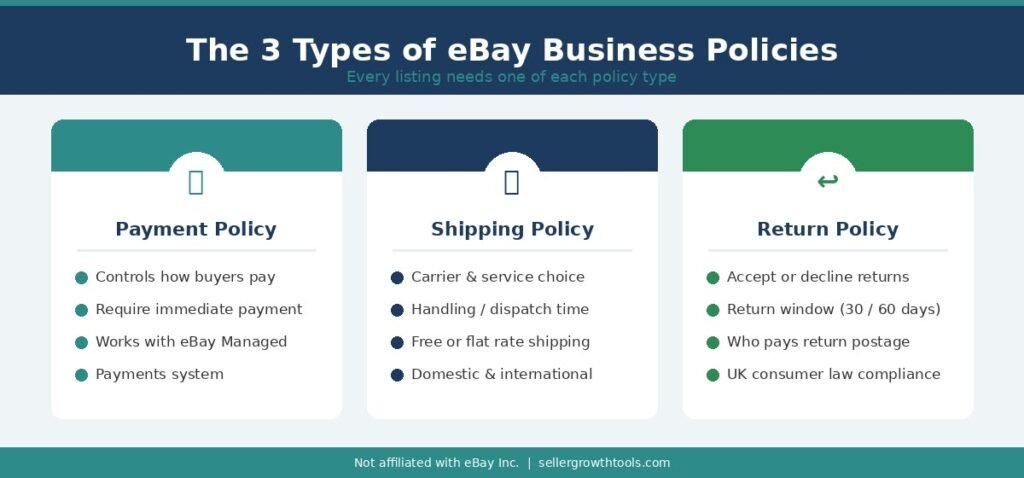
eBay Business Policies are divided into three categories, each covering a different aspect of how you sell.
Payment Policies
Payment policies define how buyers can pay for your items. For most sellers, eBay manages payment processing directly through eBay Managed Payments, so the options in this section are limited. Depending on the listing format and available account settings, payment policies may include options related to immediate payment. For eligible fixed-price listings, eBay may require buyers to provide a payment method before submitting an offer or completing a purchase. Available payment settings can vary by marketplace and listing type.
Shipping / Postage Policies
Shipping policies (called postage policies on eBay.co.uk) define:
Which carrier services you use
Your handling or dispatch time
Whether you offer free shipping or charge a flat/calculated rate
Which countries or regions you ship to
This is typically the most detailed policy type, as shipping arrangements vary considerably between sellers and listing types.
Return Policies
Return policies set out the terms under which buyers can return items. Key fields include:
Whether you accept returns at all
The return window (for example, 30 days or 60 days)
Who pays for return shipping
How your return settings apply to change-of-mind returns, while recognising that faulty, damaged or not-as-described items may still be covered by eBay Money Back Guarantee and applicable consumer protection laws. For UK business sellers, return policy settings must comply with applicable consumer protection law, which imposes minimum return rights regardless of the seller’s chosen settings.
How to Set Up eBay Business Policies — US Sellers
(eBay.com)
US sellers can create and manage Business Policies through My eBay or Seller Hub.
To access Business Policies on eBay.com:
Sign in to your eBay seller account.
Go to My eBay → Account → Business Policies.
If prompted, opt in to Business Policies.
Select Create policy and choose the policy type: Payment, Shipping, or Return.
Name the policy clearly (for example, “US Standard Shipping – 2 Day Handling”).
Fill in the required fields for that policy type.
Save the policy.
Once saved, the policy appears in your policy list and can be selected when creating or editing listings.
Creating a US Shipping Policy
When creating a US shipping policy, the main fields to complete are:
Policy name: Use a clear, descriptive name that identifies the carrier, speed or handling time.
Handling time: Set a realistic dispatch period. If your products require two business days to prepare and pack, select two business days — not same day.
Shipping service: Choose from available carrier services, such as USPS Ground Advantage, UPS Ground, or FedEx Home Delivery.
Shipping charge: Select flat rate, calculated shipping based on the buyer’s location, or free shipping.
Ship-to locations: Specify whether you ship domestically only or include international destinations, and configure any exclusions.
Example US Shipping Policy Settings
SettingExample ValuePolicy NameUS Standard Shipping – 2 Day HandlingMarketplaceeBay.comHandling Time2 business daysShipping ServiceUSPS, UPS or FedEx (eligible standard service)Shipping ChargeFree shippingShip-to DestinationUnited States
These are illustrative settings. Choose the carriers, handling times and shipping charges that reflect your actual fulfilment capabilities.
How to Set Up eBay Business Policies — UK Sellers
(eBay.co.uk)
On eBay.co.uk, the process is similar but the terminology differs slightly. eBay UK refers to shipping policies as postage policies, and handling time is referred to as dispatch time.
To access Business Policies on eBay.co.uk:
Sign in to eBay.co.uk.
Open My eBay → Account.
Select Business Policies.
If this is your first time, opt in when prompted.
Click Create policy and choose the policy type.
How to Create a UK Postage Policy — Step by Step
In Business Policies, select Create policy → Postage.
Enter a clear, descriptive Policy name (for example, “UK Standard Post – 2 Day Dispatch”).
Choose your delivery service from the available options (for example, Royal Mail 2nd Class or an Evri service).
Set your postage charges — free postage, flat rate, or calculated based on weight and destination.
Enter your dispatch time — the number of working days it takes you to send the item after payment.
Configure international postage settings if you ship outside the UK.
Review all settings and click Save.
Once saved, apply the policy to your listings individually or use bulk edit tools to update multiple listings at once.
UK Shipping Services and Dispatch Time
UK sellers can choose from a range of delivery services, including Royal Mail, Evri, DPD and other couriers supported on eBay.co.uk. The services available may vary depending on the listing category, seller account, delivery location and whether eBay Simple Delivery applies. When setting dispatch time, be realistic. If you need two working days to pick, pack and hand over items to a courier, set two working days — not same day or next day. Overpromising on dispatch time can result in late shipments and negatively affect your Late Shipment Rate. However, late shipments alone do not automatically count as transaction defects or cause a Below Standard seller rating.
Example UK Postage Policy Settings
SettingExample ValuePolicy NameUK Standard Post – 2 Day DispatchMarketplaceeBay.co.ukDispatch Time2 working daysCarrier / ServiceRoyal Mail or Evri (eligible standard service)Postage ChargeFree postageDestinationUnited Kingdom
This is an illustrative example. Available services and postage options depend on your listing type and account.
Important: eBay Simple Delivery for UK Private Sellers
Eligible private sellers on eBay.co.uk may be required to use eBay Simple Delivery instead of manually selecting their usual postage arrangements. With Simple Delivery, eBay recommends parcel details and provides a prepaid delivery label when an eligible item sells. Business sellers should follow the delivery options available to their own account and listing type.
eBay Return Policies for UK Sellers — What You Need to Know
Return policies on eBay.co.uk involve more than just choosing a return window. UK business sellers must also consider applicable consumer protection law, which sets minimum return rights that apply regardless of the seller’s chosen eBay policy.
The 14-Day Cancellation Right
Under UK consumer law (the Consumer Contracts Regulations 2013), buyers purchasing online from a business seller generally have the right to cancel their order within 14 days of receiving the goods, even if the item is not faulty.
After notifying the seller of their cancellation, the buyer typically has a further 14 days to return the item.
This right applies to most online purchases from UK business sellers. Some categories — including certain perishable goods, custom-made items and digital downloads once accessed — may be exempt. A seller’s chosen eBay return policy cannot override these statutory rights where they apply.
Consumer Rights Act 2015 — Faulty Goods
For items that are faulty, not as described, or not fit for purpose, buyers may have additional rights under the Consumer Rights Act 2015. These rights apply on top of any eBay return policy and cannot be excluded by a seller’s settings.
When setting up your return policy on eBay.co.uk, ensure your terms do not conflict with these statutory rights. If a buyer raises a claim for a genuinely faulty item, eBay’s Money Back Guarantee and applicable UK consumer law both provide a basis for a resolution in the buyer’s favour.
What to Include in Your UK Return Policy
When creating a return policy for eBay.co.uk, consider the following:
Return window: Choose an eBay return period appropriate for your products and marketplace requirements. A 30-day return window is a common option, but it should not be confused with the separate statutory cancellation rights that generally apply to eligible online purchases from UK business sellers.
Who pays return postage: Clearly state whether you or the buyer covers return shipping costs. For change-of-mind returns, sellers are not required under UK law to cover return postage — but for faulty goods, the seller is generally expected to do so.
Condition of returned items: Clearly explain any condition requirements for voluntary returns without restricting the buyer’s statutory rights. For eligible UK consumer cancellations, buyers can generally inspect goods as they would in a shop, although deductions may be permitted if handling reduces the item’s value beyond what is necessary to establish its nature, characteristics and functioning.
International returns: If you ship internationally, specify whether your return policy applies to overseas buyers and who covers international return postage.
Faulty goods: Make clear that your policy does not limit any applicable statutory rights.
For further guidance on UK consumer rights, the UK government’s official website (gov.uk) publishes guidance on online returns and refunds.
Important: A seller’s voluntary return policy does not override the buyer’s statutory rights. Even if a listing states that returns are not accepted, eligible buyers may still be entitled to remedies for faulty, damaged or misdescribed goods under applicable consumer protection laws. eBay Money Back Guarantee may also apply where its eligibility requirements are met.
UK Business Sellers vs Private Sellers
On eBay.co.uk, sellers are classified as either business sellers or private sellers. This distinction affects what policies, obligations and disclosures apply to you.
Business sellers are individuals or organisations selling in the course of a business. On eBay, business sellers must:
Display appropriate business information on their account (business name, address, contact details)
Comply with consumer protection laws applicable to business-to-consumer transactions
Offer return terms that meet the minimum requirements applicable to their trading status
Private sellers are individuals selling personal items they no longer need. Private sellers generally have fewer formal obligations, though eBay’s Money Back Guarantee still applies to all sellers on the platform.
If you operate as a business but have registered as a private seller, you may be misclassifying your account. This can create compliance issues. If you are in any doubt about your status, review eBay’s guidance on business seller registration and consider seeking advice from a legal or tax professional familiar with UK ecommerce.
US vs UK eBay Business Policies — Key Differences
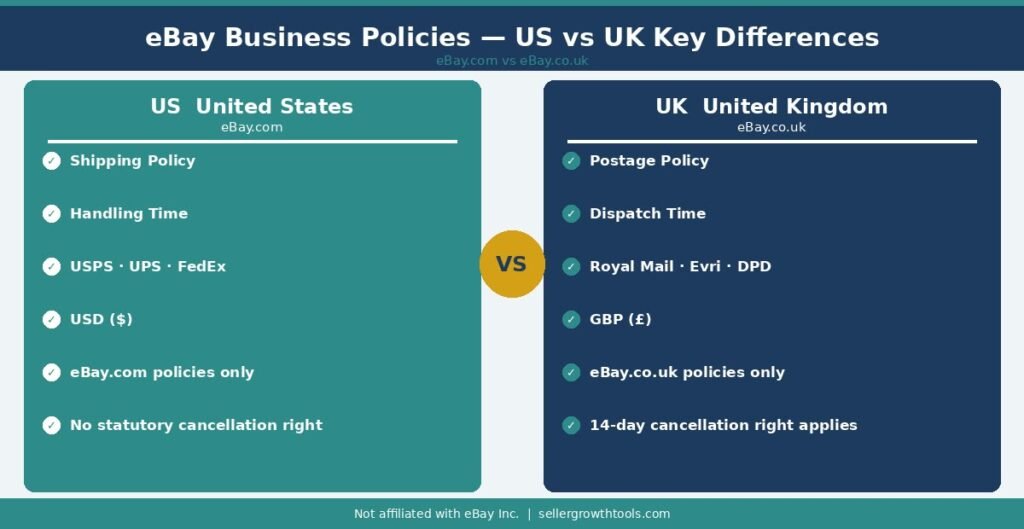
Feature🇺🇸 United States (eBay.com)🇬🇧 United Kingdom (eBay.co.uk)Main MarketplaceeBay.comeBay.co.ukShipping TermShipping PolicyPostage PolicyDispatch TerminologyHandling TimeDispatch TimeCommon CarriersUSPS, UPS, FedEx Royal Mail, Evri, DPD CurrencyUSD ($)GBP (£)Return LaweBay policies + applicable US lawseBay policies + UK consumer law14-Day Cancellation Right Not a statutory requirementApplies to most business-to-consumer salesBulk Policy Updates Supported for eligible listingsSupported for eligible listingsPolicy TemplatesCreated specifically for eBay.com Created specifically for eBay.co.uk.
Can You Use the Same Business Policies on eBay US and UK?
No. Business policy templates are marketplace-specific. A shipping policy created on eBay.com is not automatically available for listings on eBay.co.uk, and vice versa.
This is an important point for sellers who operate on both marketplaces. You will need to create and maintain separate sets of policies for each site — one set for eBay.com and another for eBay.co.uk.
While some Business Policy account enrollment can apply globally, the individual policy templates themselves must be configured separately per marketplace. Attempting to apply a US shipping policy to a UK listing, or vice versa, will typically result in errors or missing policy options in the listing form.
For sellers active on both marketplaces, a practical approach is to keep your policy names clearly labelled — for example, “US Shipping – Standard” and “UK Postage – Standard” — so there is no confusion when editing or applying policies to new listings.
Why Are eBay Business Policies Not Showing?
If you cannot find the Business Policies option in your eBay account, try the following troubleshooting steps:
- Check your account settings: Sign in to the correct eBay marketplace and look for Business Policies under your account settings.
- Check whether enrollment is required: If eBay offers an option to opt in to Business Policies, follow the on-screen instructions.
- Try Seller Hub: Open Seller Hub and check the available listing and account management options.
- Use a desktop browser: If the option is missing in the eBay app, try accessing your account through a desktop browser.
- Contact eBay Support: If Business Policies are still unavailable, contact eBay Support to check whether there are account-specific restrictions or technical issues.
The location and availability of Business Policies settings may vary depending on your marketplace, account type and current eBay interface.
Best Practices for Managing eBay Business Policies
Use descriptive policy names. Vague names like “Policy 1” or “My Shipping” become confusing as your policy list grows. Include the marketplace, handling time and key detail in the name — for example, “UK Free Post – Next Day Dispatch” or “US Flat Rate – 3 Day Handling”.
Set realistic handling and dispatch times. Overpromising on dispatch speed is one of the most common causes of late shipment defects. Set the time you can consistently meet, not the best-case scenario.
Review policies after any operational change. If you hire staff, change couriers, move warehouse or adjust your working hours, update your policies to reflect your new fulfilment capabilities.
Review associated listings before saving a policy update. When you edit a shared Business Policy and save it, the change applies to all eligible listings using that policy — you cannot selectively apply it to a subset. Before saving, review which listings are attached to the policy. After saving, check the Activity Log (or any available error report) to confirm which listings updated successfully and whether any were skipped or flagged.
Keep UK return policies compliant. Review your UK return settings any time eBay updates its seller standards or when you become aware of changes to applicable UK consumer protection rules. A seller’s eBay policy settings cannot override statutory consumer rights — but setting clear, compliant terms reduces buyer confusion and disputes.
Separate policies for separate products where needed. If you sell both fragile items with special packaging requirements and standard goods, you may want separate shipping policies to reflect different handling times or carrier requirements for each product type.
Why Does eBay Create “Copy of…” Business Policies?
When you edit a shared Business Policy, eBay updates compatible listings. However, some listings may be restricted from revision or incompatible with the new settings. In these cases, eBay may automatically create a policy beginning with “Copy of” to preserve the original terms for affected listings. Review the policy update status and any available error report before reassigning those listings.
Important 2026 Update: Business Policies for Vehicles
Starting July 20, 2026, eBay Business Policies no longer apply to listings in the Vehicles category. Sellers instead enter the applicable deposit, payment and shipping details during vehicle listing creation. This change applies to the Vehicles category specifically and should not be assumed to apply to automotive parts or accessories listings.
Frequently Asked Questions
What is an eBay Business Policy?
An eBay Business Policy is a saved template that stores your shipping, payment or return settings. You create a policy once and apply it to multiple listings, rather than entering the same details on every listing individually.
Do I need an eBay Store to use Business Policies?
No. Business Policies are available to eligible sellers without a paid Store subscription. However, some advanced features may be more relevant to high-volume sellers who benefit most from managing listings in bulk.
How do I access Business Policies on eBay.co.uk?
Go to My eBay → Account → Business Policies. If you have not previously enrolled, you may be prompted to opt in before you can create policies.
What is the difference between handling time and dispatch time?
They refer to the same concept — the number of days between receiving payment and sending the item. eBay.com uses “handling time” while eBay.co.uk uses “dispatch time”.
Can I apply one policy to all my listings?
Yes, if all your listings share the same shipping or return arrangements. Many sellers create a small set of policies (for example, one standard postage policy and one expedited option) and apply the relevant one to each listing.
What happens if I update a Business Policy?
When you update a saved policy, the changes apply to all listings currently using that policy. This is one of the main advantages of Business Policies — you can update your terms across many listings at once rather than editing each one individually.
Do UK business sellers have to offer returns?
UK business sellers must comply with applicable consumer protection law. For most online purchases from a business seller, buyers have a statutory right to cancel within 14 days of receipt and return the item within a further 14 days. A seller’s eBay return policy cannot remove these rights where they apply.
Can I create different policies for different product types?
Yes. You can create multiple policies of the same type — for example, two shipping policies with different handling times for different product categories — and apply the relevant one to each listing.
What should I do if a listing shows a policy error after an update?
Check the affected listings individually. Policy update errors can occur if a listing type is not compatible with a policy setting, or if the bulk update was interrupted. Correct any errors manually and verify that the listing saved successfully before leaving the page.
Related Guides & Tools
A complete breakdown of eBay’s fees for UK and US sellers — insertion fees, final value fees, and Store subscription costs.
How to calculate your postage and shipping costs accurately so your listings remain profitable.
Whether a paid eBay Store is worth it for your business — plans, costs and allowances for US and UK sellers.
How dispatch times and return handling affect your seller metrics — and how to protect your account standing.
How to pause or manage your listings and buyer expectations when you need a break from selling.
Muhammad Usman
eCommerce & SEO Specialist
Muhammad Usman is an eCommerce and SEO specialist with hands-on experience managing eBay and other online marketplaces. He creates practical guides and free seller tools designed to help online sellers understand fees, shipping, profitability and day-to-day marketplace operations.
We use official eBay documentation as a primary source when researching seller policies, fees and requirements. More about this site · Get in touch