eBay Order cancellations are one of those things that look straightforward until they’re not. A buyer asks to cancel. Or you need to cancel. Or a buyer didn’t pay and you’re trying to recover your fees. Each situation works differently, carries different consequences, and requires a different response.
This guide covers every eBay order cancellation scenario from the seller’s side — how each type works, what to click, which cancellation reason to select, what happens to your fees, and how cancellations affect your seller performance metrics.
Types of eBay Order Cancellations
Before anything else, it helps to understand that eBay has three distinct cancellation scenarios, each with its own process and outcome:
Buyer requests a cancellation
The buyer contacts you — through eBay Messages or the cancellation request system — asking to cancel before the item is dispatched. This is the most common scenario and usually the simplest to handle.
Seller cancels the order
You need to cancel — the item is out of stock, damaged, or incorrectly listed. This is a seller-initiated cancellation and carries more weight in terms of your metrics than a buyer-requested one.
Cancellation after non-payment
The buyer committed to the purchase but never paid. This goes through the Unpaid Item case process before the order can be cancelled. See our full guide: eBay Buyer Has Not Paid. Understanding which scenario you’re in determines everything else — which process to follow, which reason to select, and what the outcome will be for your account.
How to Cancel an eBay Order as a Seller
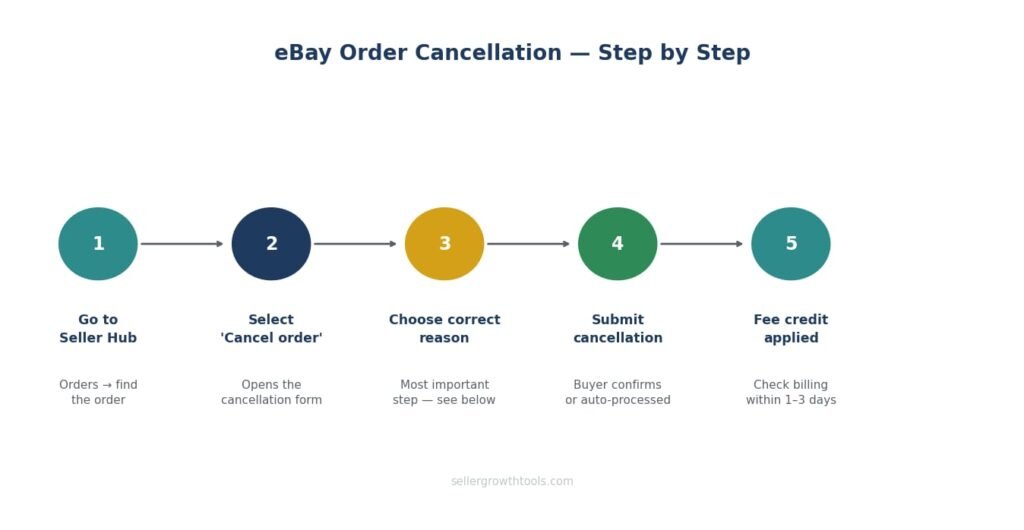
Cancel through Seller Hub or Resolution Centre — not through eBay Messages alone. A message conversation with a buyer is not a cancellation. The order remains open until you complete the formal cancellation process.
Step 1 — Go to Seller Hub
Log into eBay → Seller Hub → Orders → find the relevant order.
Step 2 — Select “Cancel order”
Click on the order, then select “Cancel order” from the options. This opens the cancellation form.
Step 3 — Choose the correct cancellation reason
This step is the most important one. The reason you select has a direct impact on your seller metrics:
Buyer asked to cancel — use this when the buyer has requested the cancellation. Requires the buyer’s agreement or a cancellation request from them. Does not count against your metrics when used correctly.
Out of stock or item damaged — use this when you can’t fulfil the order. This is a seller-initiated cancellation and does count against your metrics. Use it only when accurate.
Issue with buyer’s address — for genuine address problems. Use carefully — misuse can still affect your account.
Buyer has not paid — only after completing the Unpaid Item case process. Does not count against your metrics when used correctly.
Step 4 — Submit the cancellation
Once you confirm, eBay processes the cancellation. If it’s a buyer-requested cancellation, eBay may ask the buyer to confirm. If the buyer doesn’t respond within a set window, eBay processes it automatically.
Step 5 — Confirm the fee credit
After cancellation, check your Seller Hub billing summary. Your final value fee should be credited back within a few days. If you used a promoted listing, the promoted listing fee is also typically credited when a sale is cancelled before dispatch.
When a Buyer Requests an eBay Order Cancellation
A buyer can request a cancellation through their order details page. You’ll receive a notification in Seller Hub and via email.
How long do you have to respond?
eBay gives you 3 days to respond to a buyer’s cancellation request. If you don’t respond within 3 days, eBay may automatically cancel the order and issue a refund to the buyer.
Should you accept or decline?
Accept if:
The item hasn’t been dispatched yet
It’s a simple cancellation with no complication
Accepting protects the relationship and avoids a potential return later
Decline if:
The item has already been dispatched
You have tracking showing it’s in transit
The buyer’s reason doesn’t hold up
If the item has already been dispatched when the buyer requests cancellation, explain this in your response and direct the buyer to your returns policy. At that point, the transaction needs to complete and the buyer can return the item through the normal returns process.
What happens to the refund?
If you accept the cancellation before dispatch, eBay processes the refund to the buyer automatically through the original payment method. You don’t need to issue the refund manually — it’s handled through the cancellation system.
If the buyer paid by card, the refund timeline depends on their bank — typically 3–5 business days.
eBay Order Cancellation After Payment — What Changes?
Once payment has been made, the cancellation process is the same — but there are a few additional things to check.
Refund of the purchase price
When you cancel after payment, eBay issues the refund to the buyer from the funds in your Managed Payments account. If your balance doesn’t cover the refund, eBay will debit your linked bank account.
Promoted Listings fee
If the sale came through a Promoted Listings ad, the ad fee is charged only when a sale completes. If the order is cancelled before the item is delivered, the Promoted Listings fee is typically reversed. Check your billing statement to confirm.
For a full breakdown of Promoted Listings costs: eBay Promoted Listings Guide
Final value fee credit
eBay credits your final value fee once the cancellation is confirmed. This usually appears within 1–3 business days in your Seller Hub billing summary.
How eBay Order Cancellations Affect Your Seller Metrics
Not all cancellations are equal in eBay’s eyes. A buyer-requested cancellation handled correctly has no impact on your metrics. A seller-initiated cancellation for reasons within your control does — and repeated seller-initiated cancellations can push your account toward Below Standard.
What counts against you
Seller-initiated cancellations — orders you cancel because of stock issues, listing errors, or pricing mistakes. These are counted in your “cancellation rate” metric in Seller Hub.
eBay’s threshold: your cancellation rate should stay below 2%. Above that, your account may be flagged.
What doesn’t count against you
Buyer-requested cancellations — when the buyer asks to cancel and you accept. As long as you select “Buyer asked to cancel” and the buyer genuinely requested it, this doesn’t affect your metrics.
Unpaid Item cancellations — when you’ve completed the Unpaid Item case process and cancel with the reason “Buyer has not paid.” These are excluded from your cancellation rate.
How to check your cancellation rate
Seller Hub → Performance → Sales → Cancellations. This shows your rate over the last 3 months — the window eBay uses for performance evaluation.
Full detail on eBay’s performance standards: eBay Seller Performance Guide
Cancellation Reasons — Which One to Use
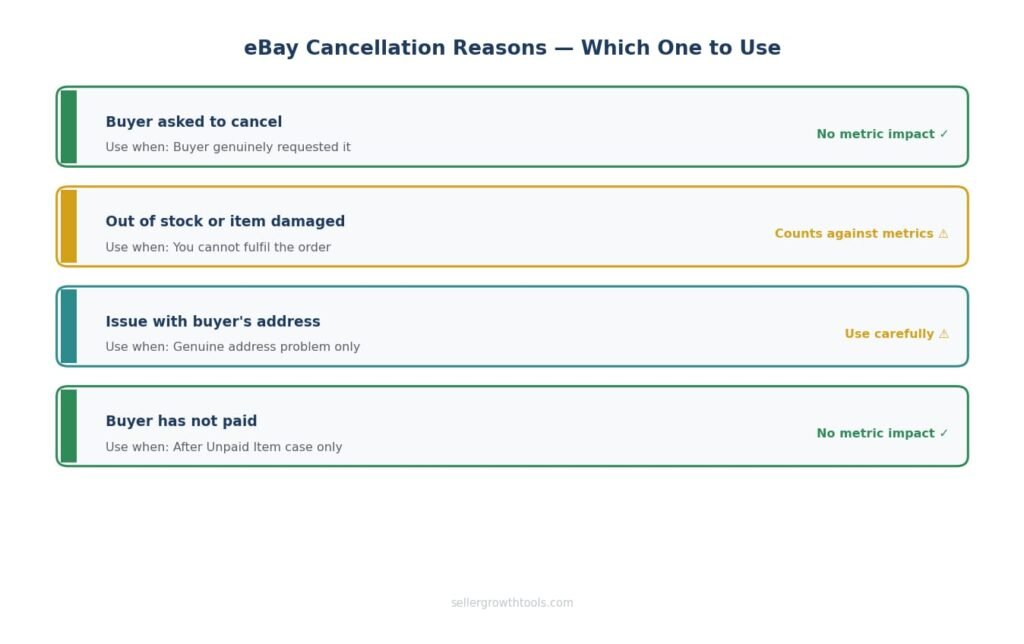
This is where many sellers make avoidable mistakes. Selecting the wrong cancellation reason is one of the most common causes of unexpected metric drops.
Buyer asked to cancel — when to use it
Use this only when the buyer has genuinely requested the cancellation. If you use this reason without a buyer request, eBay may flag it — especially if it happens repeatedly.
Out of stock or item damaged — when to use it
Use this when you cannot fulfil the order for a genuine reason — stock ran out, the item was damaged before dispatch, or there was a fulfilment error. This is a seller fault cancellation and does count against your metrics. Use it honestly and sparingly.
Issue with buyer’s shipping address — when to use it
Only when there’s a genuine address problem — incomplete postcode, non-existent address, or an address flagged as undeliverable. Don’t use this as a workaround for other issues.
Buyer has not paid — when to use it
Only after completing the Unpaid Item case process through Resolution Centre. This reason triggers the fee credit and doesn’t count against your metrics. For full detail: eBay Buyer Has Not Paid Guide
Can a Buyer Cancel an eBay Order After It’s Been Dispatched?
Technically, no — buyers cannot cancel through the standard cancellation process once an item is dispatched. But they can request a return once the item arrives.
What to do when a buyer requests cancellation on a dispatched item
Explain that the item has already been sent and share the tracking information. Let them know that once it arrives, they can request a return if needed. Most buyers accept this without issue.
Do not cancel a dispatched order. Doing so creates a situation where the buyer receives the item but has already been refunded — recovering from that is significantly more complicated than a standard return.
Returns vs cancellations
A cancellation is for orders that haven’t yet been fulfilled. A return is for items that have been delivered but the buyer wants to send back. They go through different processes and have different fee implications.
For the returns process: eBay Returns & Refunds Guide
eBay Cancellation Policy — Key Rules for Sellers
Immediate payment listings
If you’ve set “Immediate payment required” on a Buy It Now listing, buyers cannot commit without paying. This eliminates the non-payment scenario entirely but doesn’t prevent a buyer from requesting a cancellation after payment.
Good ‘Til Cancelled listings
If you cancel an order on a GTC listing, the listing remains active. Check that your inventory is updated before the listing generates another sale you can’t fulfil.
Business vs private sellers
The cancellation process is the same for business and private sellers. However, business sellers operating under UK consumer law may have different obligations around buyer-requested cancellations — specifically, buyers have a 14-day right to cancel distance selling contracts under the Consumer Contracts Regulations.
If you sell as a business seller to UK buyers, familiarise yourself with these obligations. eBay’s Money Back Guarantee overlaps with but doesn’t replace your statutory obligations.
UK VS US Cancellation Differences
| UK Sellers | US Sellers | |
|---|---|---|
| Cancellation process | Same — through Seller Hub | Same — through Seller Hub |
| Refund method | Managed Payments → original payment | Managed Payments → original payment |
| Buyer cancellation window | Before dispatch | Before dispatch |
| Consumer law | 14-day right to cancel (business sellers) | Varies by state |
| Metric impact | Same thresholds | Same thresholds |
| Promoted Listings fee | Reversed on cancellation | Reversed on cancellation |
The main difference is consumer law — UK business sellers have statutory obligations around cancellations that go beyond eBay’s own policy. Private sellers are not subject to the same Consumer Contracts Regulations.
How to Avoid Unnecessary Cancellations
Most seller-initiated cancellations are avoidable. These habits reduce them significantly:
Keep your inventory accurate
The most common cause of seller-initiated cancellations is an item selling on eBay after it’s already sold elsewhere, or stock running out before the listing is updated. If you sell across multiple platforms, use inventory management software or check your stock levels daily.
List only what you have
It sounds obvious, but listing items you don’t yet have in stock — relying on a supplier to deliver in time — creates regular cancellation risk. One delayed delivery creates a seller-initiated cancellation that affects your metrics for 3 months.
Check listings regularly
Pricing errors, incorrect quantities, and outdated item specifics are all reasons sales fall through. Reviewing active listings weekly prevents many of these.
Use Immediate payment required
On Buy It Now listings, this eliminates non-payment cancellations entirely. Buyers can’t commit without completing payment.
Frequently Asked Questions
How do I cancel an eBay order as a seller?
Go to Seller Hub → Orders → find the order → select “Cancel order” → choose the correct reason → confirm. The refund is processed automatically.
Can I cancel an eBay order after it’s been paid?
Yes. The process is the same — go through Seller Hub. The buyer’s payment will be refunded automatically once the cancellation is confirmed.
Does cancelling an eBay order affect my seller metrics?
It depends on the reason. Buyer-requested cancellations and unpaid item cancellations don’t affect your metrics. Seller-initiated cancellations (out of stock, item damaged) do count against your cancellation rate.
How long does an eBay order cancellation take?
Once you submit the cancellation, it’s usually processed within minutes. The refund to the buyer typically takes 3–5 business days to appear, depending on their payment method.
What if a buyer doesn’t respond to my cancellation request?
If you’ve submitted a cancellation and the buyer doesn’t respond within 3 days, eBay typically processes it automatically.
Can a buyer cancel an eBay order after it’s dispatched?
No — the standard cancellation process is only available before dispatch. Once dispatched, the buyer can request a return after delivery.
Will I get my final value fee back after a cancellation?
Yes — eBay credits your final value fee once the cancellation is confirmed. Check your Seller Hub billing summary within 1–3 business days.
What cancellation reason should I choose if I’m out of stock?
Select “Out of stock or item damaged.” This is honest and the correct reason — but be aware it counts as a seller-initiated cancellation and affects your cancellation rate.
How many cancellations can I have before it affects my account?
eBay’s threshold is a 2% cancellation rate. This is calculated over your last 3 months of transactions. One or two cancellations on a healthy account won’t cause issues — a pattern will.
What’s the difference between a cancellation and a return?
A cancellation is for orders not yet fulfilled. A return is for delivered items the buyer wants to send back. They go through different processes in Seller Hub.
Related Guides
When a buyer commits but doesn’t pay — the Unpaid Item case process explained.
When the item was delivered but the buyer wants to send it back.
How your cancellation rate affects your defect rate and seller level.
Where a high cancellation rate can eventually take your account.
How Promoted Listings fees are reversed when an order is cancelled.
How cancellations and poor service lead to negative feedback — and what to do about it.
When the buyer says the item never arrived — a different problem from cancellation.
Muhammad Usman
eCommerce & SEO Specialist
Muhammad manages eCommerce operations and SEO for UK sellers across eBay, Etsy, Shopify and TikTok Shop. He built SellerGrowthTools to give sellers the fee and profit numbers they need before they list, not after.
Every guide here is checked against eBay’s current documentation before publishing and revisited when policies change. More about this site · Get in touch